

Relevanssi Premium can extract text from PDF files in the WordPress Media Library and make that text searchable. You can return the document itself as a search result, or include its text in the index of the post or page it is attached to.
There are two separate steps: reading the file stores its extracted text, and indexing makes that text available to search. This guide uses the current settings under Relevanssi > Settings.
Which PDF files can you index?
Upload the file to the Media Library so WordPress creates an attachment post for it. A file URL in a page is not, by itself, an attachment post or a parent relationship.
PDFs must contain a readable text layer. Try selecting and copying a sentence in your PDF reader: if the file contains only scanned images, apply OCR before using Relevanssi. Relevanssi does not perform OCR. A text layer is a prerequisite, not a guarantee that every PDF will extract successfully.
The Attachments settings document a maximum file size of 256 MB. An active Premium API key is needed for the external extraction service. You can find your key in your Relevanssi account; in a multisite network, the key is configured in the network settings.
What about other attachments?
The extraction service also supports Word documents (DOC/DOCX), OpenDocument files, RTF and EPUB. The attachment workflow is the same: read the text, select how it should be indexed, and test the resulting search. Compressed archives are not supported by the workflow described here.
How does attachment indexing work?
Successful extraction stores text in the attachment’s _relevanssi_pdf_content custom field. Errors are stored in _relevanssi_pdf_error. The field names contain “pdf” even when the source is another supported document format.
On the Indexing tab, choose the result you want:
- The file as a separate result: select Media (attachment) in the post type table. Relevanssi includes the extracted attachment text when indexing that attachment.
- The parent article as the result: enable Link files to parent posts under Special Indexing and ensure the parent post type is selected for indexing. The attachment must have that post or page set as its WordPress parent.
- Both: enable both options. The file and its parent can then match searches.
Embedding a PDF, adding a link, or selecting a file in an ACF field does not necessarily set its WordPress parent. Check the attachment’s association if you expect its text to make an article searchable.
Save your indexing settings before rebuilding. Successful reading can also update the attachment and its parent as part of the reading workflow, but it does not replace a rebuild after you change the indexing rules for existing content.
External processing and file access
Text extraction uses an external service based on Apache Tika. Under Attachments > Configuration Options, Processing server location offers United States and European Union servers.
By default, the service receives a URL from which it can download the file. Enable File Access Method to upload file data instead when the service cannot fetch your file directly, for example on a protected site. Your WordPress server still needs outbound access to the extraction service. This option does not provide offline extraction.
Consider the file’s contents before sending it to an external service. Do not process highly confidential files without first assessing whether that processing is appropriate for your site. See the privacy policy for the service’s published information.
Read and inspect a single file
- Open the file’s editing screen in the Media Library. From the attachment details view, choose Edit more details.
- Find the Relevanssi attachment controls and click Read the attachment content.
- Inspect Attachment content to confirm that the expected text was extracted. If reading fails, inspect Attachment error.
- With your indexing rules saved, rebuild the index if necessary and search for a distinctive word from the document.
Read files in bulk
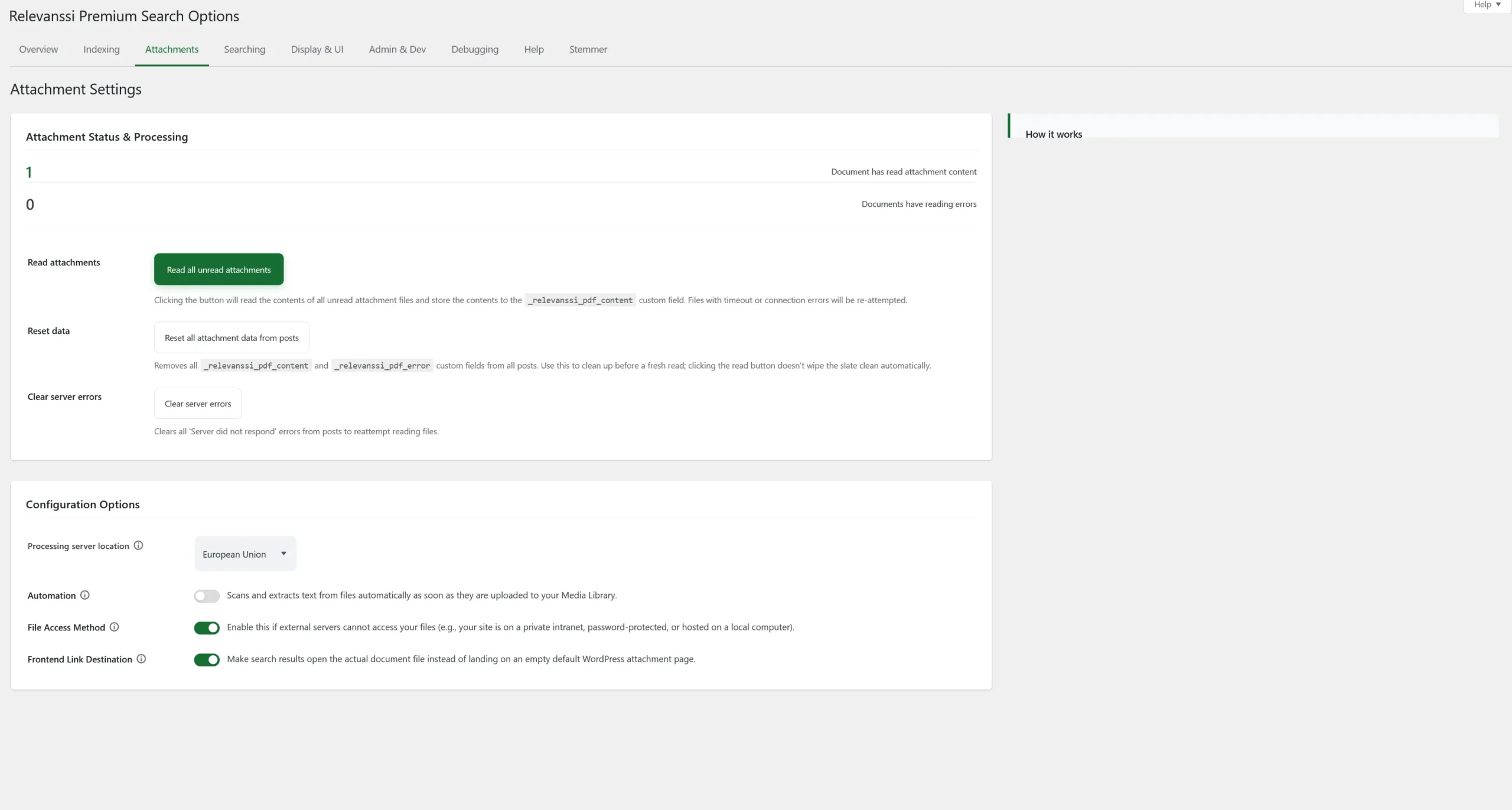
Open the Attachments tab and use Read all unread attachments. This stores extracted text for unread files; it is not a clean reread of every document. Files with timeout or connection errors can be retried.
The same tab provides Clear server errors for retrying files with “Server did not respond” errors, and Reset all attachment data from posts for clearing stored attachment data before a fresh read. A reset is a maintenance action that removes stored data; it is not required for normal initial setup.
Under Configuration Options, the Automation switch enables reading new files when they are uploaded. For a large import, you may prefer to read them afterwards in bulk.
Show document text in search result snippets
On Display & UI, enable Custom excerpts/snippets and Use custom field content for building excerpts, then save the options. Your search template must display the excerpt using the_excerpt() or a compatible integration. Long document texts can increase the work needed to generate snippets; test with representative files.
To request a phrase search, enclose the words in quotation marks, for example "annual report". This searches the extracted and indexed text. Highlighting in the website’s result snippet does not modify or highlight the PDF file itself.
If you return attachments as separate results, Frontend Link Destination on the Attachments tab can make the result link open the document file instead of its WordPress attachment page. This changes the link destination, not which text is indexed.
Edit the extracted text
You can edit Attachment content on the attachment editing screen and save it. Relevanssi marks edited text as modified to preserve it during general rereading. To replace that edited text from the source file, use Reread the attachment content on that attachment’s editing screen.
Developers can use relevanssi_file_content to modify extracted text before it is stored. After changing how existing text should be processed, reread the relevant files and refresh their index entries.
If the expected result does not appear
- No extracted text: inspect Attachment error, confirm the file has readable text, check the API key, and verify access to the selected service. A protected download URL may require File Access Method.
- Text extracted but not searchable: check Media (attachment), or Link files to parent posts and the actual parent association. Save changes and rebuild after changing indexing rules.
- The parent matches but the file does not: check whether you selected attachment indexing, not only parent indexing.
- Index terms exist but no frontend result: check the search form’s post type restrictions and the settings on the Searching tab. A search restricted to ordinary posts cannot return attachment posts.
- A result appears without the document text: check the Display & UI snippet switches and the theme’s excerpt output.
Developers can set post_types through relevanssi_modify_wp_query. This example applies to all Relevanssi searches and limits results to posts, pages, and attachments. Adapt the list to your site, and add a query condition if only one particular search form should be affected:
add_filter( 'relevanssi_modify_wp_query', 'rlv_search_with_attachments' );
function rlv_search_with_attachments( $query ) {
    $query->query_vars['post_types'] = 'post,page,attachment';
    return $query;
}
See Installing Relevanssi and adjusting the settings for the complete settings guide.

78 Comments. Leave new
Hi Miko,
How to index a file on media, such as a PDF file. Is it possible?
Thanks
What does “file on media” mean, exactly? Relevanssi doesn’t care where the PDF file is located, as long as it’s accessible and there is an attachment post corresponding to it in the Media Library.
Hi
Consultation before purchase
Does the plugin know how to read PDK files for searching within the files *in Hebrew?!*
Note that Hebrew is written from right to left (RTL)
Relevanssi works with Hebrew and Arabic; the direction of writing does not matter. As long as the text in the PDFs is in the correct format, Relevanssi can handle it. Relevanssi doesn’t do OCR.
Hi Mikko,
just got around to looking at the results of Relevanssi Premium indexed PDFs – this is great stuff and will probably make my and my clients life a lot easier.
One q: is there a way to limit the word or characters numbers for attachment indexing, e.g. only index the first 1000 chars of every PDF? This would make search results less relevant in some cases, but more relevant in many other cases here. Manually adjusting on a per-attachment basis is of course an option, but with 100s of files a bit time-consuming.
Thanks! Phil
Phil, what’s the goal with indexing fewer content for the attachments? I wonder if the same goal can be achieved with other methods. Indexing just part of the post will leave content out of the search. If you think that’s the way to go, the filter hook
relevanssi_file_contentfilters the PDF content before it is saved in the custom field, so you can use that to remove parts of the content.If the problem is that long posts get too much weight compared to more keyword-dense shorter posts, I would recommend leaving the PDF content untouched and instead boosting the shorter posts.
Hi Mikko
Does the plugin support search in PDF in Arabic language ?
Thanks
Bassam, yes. Here’s some relevant information about languages and Relevanssi.
is it possible to have a big pdf file be linked to different links in a page. The purpose is so that when a new pdf file is uploaded, the links remain unchanged. All links will be linked to that one document that will have many paragraphs or headers that will need to be linked to. Is this possible with this product?
Carol, I’m not sure how what you describe is related to searches.
Hi Mikko,
I’m on multisite and don’t see where I can enter my Premium API key in Network Admin Settings. Any help would be greatly appreciated!
John
John, if you have Relevanssi Premium correctly installed as a network plugin and you have proper capabilities, there should be a “Relevanssi Premium” item in the sidebar menu.
Thanks Miko,
I did delete the plugin because it didn’t seem to be working properly, then reinstalled the free version. Is it possible to download the version of the premium plugin I purchased previously (annual license)? Or alternatively, is it possible to restore the previous premium version from the current free plugin?
Will Relevanssi search results link to the specific result location in a PDF, or the beginning of that PDF file?
Doug, no, that’s not possible, the PDF format doesn’t support that.
Sorry, I have no solutions for that. The Relevanssi admin search (Dashboard > Admin search) is the best solution I know; it’s not the most pretty or user-friendly search, but it can be developed further, so perhaps some kind of custom solution based on that might be good.
Hi Mikko,
Just bought the premium version and thanks for the plugin!
I am using a pluging called WP File Download to manage my files. All the files are stored under upload/wpfd folder and all the files are ‘wpfd_file’ type. Is there a method to allow Relevanssi to index the PDF files in there? Or is it possible to let Relevanssi not sent the files from Media Library folder, but from a custom folder?
Thanks!
Sihan, unofortunately Relevanssi PDF reader can’t access those files. The PDF reading only works for attachments that are in the Media Library. The exact location of files doesn’t matter, they can be held somewhere else, but there must be an attachment post for each file.
Hi Mikko,
Thanks for the reply. I’m now writing a function that is added to the Relevanssi Rest API endpoint file for headless WordPress. In this way, whenever there is a search request I’ll do an additional search using an AJAX request from the file management plugin to do PDF content search. This can be done for the front-end search. I am wondering that can I add such a function to allow the admin search have the same behavior, i.e. having another search using another AJAX request for PDF search?
Thanks
Not really sure; admin search is such a mess in anyway that I’d pretty much recommend not using Relevanssi for admin searches.
So do you have any recommendations for admin search? We still need to allow customers to do searches for PDF contents, custom fields, etc. in the WordPress backend. Thanks for your help!
Hello Mikko,
just purchased the premium version today and I really love it! Thanks a lot.
One question, is there a way to add a visual icon to pdfs in serch results page?
Best, Daniel
Daniel, that’s something your theme needs to do. Relevanssi can’t do it, Relevanssi doesn’t have any control over what the search results look like. You need to edit the search results template in your theme for this. You can for example check for post type in the template and if
$post->post_mime_typeisapplication/pdf, show an icon.Hello Mikko,
thanks a lot, but that’s out of my skills 🙁
I tried https://wordpress.org/plugins/mimetypes-link-icons/ but this does not effect on searchresults.
Best, Daniel
Daniel, unfortunately there are no shortcuts available for this. It’s a fairly simple task for a WP developer. If you send me a support request with your search results template included, I can see if I can help you with this – if your theme is standard enough, I can do this for you.
Thanks a lot for the offer. I send it to you via the contactform.
Amazing plugin, thanks for the skills and brains.
I’m wondering if there is a way to also import content from a flat folder on the server? Basically we want to index some files for a dashboard/intranet. For instance we want to search for ‘Employee Handbook’ and then we will have a set of files in folders that we want to also include in Relevannsi.
I understand perhaps I need to just upload all the pages/images/pdfs/ALL the content into the media library but not sure if there is a best way you can think of. Is there a way to potentially scan the folders and add each item to the index or a post I guess then it will get indexed and then somehow wipe that indexing periodically and do it again?
Again, appreciate the skill!
Jeff, not sure – there may be tools that read in the files from the server and add them to Media Library, but I’m not aware of any. But yes, you’re right, you need to have the files in the Media Library for Relevanssi to be able to access them.
Is the meta data (title, author, subject, keywords) of the PDF indexed in a way that it can be leveraged in search results? I’m trying to build a search of PDF documents that will also allow for filtering based on the meta fields. (Show me all PDF’s that match this keyword search and match a specific PDF meta keyword).
For instance, I may want to classify documents using the “Keywords” meta data field of the PDF document. I’d then like to have some checkboxes on the search form that allow to combine a filter for the different values in these keywords combined with the keyword search.
I see that the filter functionality https://www.relevanssi.com/knowledge-base/adding-a-custom-field-filter-in-the-search/ requires a separate meta query. Could that meta query be populated by indexing one of the PDF meta data fields?
The solution doesn’t have to use the PDF meta data fields if there is an approach using built-in WordPress meta data fields or otherwise.
thanks
Mike, no, Relevanssi does not index PDF meta data. Relevanssi only reads in the PDF contents. Also, even if Relevanssi did read in the meta data, you wouldn’t be able to filter searches with it, because the structure would not be retained intact.
If you can have the PDF meta data in the WordPress attachment posts, then filtering the searches with it is simple.
Hi, interested in using this however wanted to explore the security of indexing . Are the documents transferred to the indexing service securely and the only week point is the indexing server itself?
Thanks, Barney 🙂
Barney, there shouldn’t be any weak points. All traffic between your server and the indexing server is SSL encrypted. The indexing server itself is pretty much a question of trust – I’ve chosen to trust Digital Ocean to maintain the servers, and it’s up to you whether you trust us. We’re not at all interested in what documents pass through our servers, but there’s really no way to guarantee that our server is not storing copies of the files secretly.
In most cases this does not matter, as the search is handling documents that are publicly available in any case, and we do not recommend using the document indexing for sensitive documents. Instructions for replacing the attachment server with your own are available, and that’s the recommended approach for sensitive documents.
Hi Mikko,
I am attempting to index PDFs on my site (using Relevanssi premium) and every time it attempts to process the contents of a PDF file it instead returns with the same attachement error message:
cURL error 28: Operation timed out after 45001 milliseconds with 0 bytes received
What to do?!
And: Do I have to index one simple PDF after the other from my mediathek or is it possible to do it in a way all together?!
Thank you, Thomas
Thomas, if possible, use the EU server. For some reason it works more reliably than the US server, even though both run exactly the same code. This problem is caused when the indexing server is down. I’ve rebooted the US server now and it should work, but the EU server is more reliable.
Hi Mikko,
First off, love the plugin.
I am indexing a bunch of attachment files and for some reason, some of them (about 10%) are giving me this error: “Attachment ID XX: Empty attachment file. Is the file publicly available?”
The files, as far as I can tell are available publicly (they show up on the website) and they have text content (ie not images as a pdf). When I go to the individual file and click “Index Attachment Content” it works, but I get the error when reading / indexing the attachments in bulk.
Any ideas?
Thanks!
Rob, have you tried checking the “Upload files for reading” option?
Hi Mikko,
That does seem to have worked. Thank you!
Hello Mikko Saari
my intention is to list the parent post.
Ok, in that case you need a relevanssi_content_to_index filter that for each parent post goes through the attachments attached to that post and adds the names of the attachments to the content of the parent post.
Hello Mikko Saari
Please! help me with this function
See here: https://gist.github.com/msaari/a8be590001ef26137fb9226414fb4c82
Hello Mikko
Updating on the function: I made an adaptation in the code to work with the meta (File Advanced) attachments of the famous metabox.io plugin. It has been running perfectly, and much lighter and faster than indexing the attachments in standard wordpress mode.
I sent the function to the official plugin library and it was already approved and praised by some users in the group: https://github.com/wpmetabox/library/pull/3
Thank you again.
Great!
Now it’s working perfectly, thank you Mikko Sakari.
This helped me a lot …
Okay, it’s great to know that it’s possible.
But I am not aware to customize this function.
If you can develop this role for me, email me the costs and how we could get it right.
thank you so much
Hello
I’m using the Relevanssi FREE to include the information filled in from the meta fields in the custom search results (custom type posts).
The problem is that I would like to include the name of the attachments as results to be found in this search, but from what I could see the attachment field for attachments stores only the attachment ID, so that I can not find it by name in the search results.
Can you give me some way to include the name of the attachment in the results of this custom search, without having to fill separately / manually in a text field the part. (the end user would not fill this)
The premium version extensions could help?
What exactly you want to find? Do you want to find the parent post or the attachment post? Plenty of things you can do here, mostly with relevanssi_content_to_index filter.
I have added a number of pdf files into my Media Library, and added a title and description for each. They are now accessible via URLs like http://www.amphibianark.org/wp-content/uploads/2018/07/A-process-for-assessing-and-prioritizing-species-conservation-needs-going-beyond-the-red-list.pdf I have included attachments in the indexes and have built the indexes.
However when I search for anything contained within the pdfs, it is not wound. Only strings within the title, filename or description are appearing in my results, but not actual content from the pdfs.
The file types are showing as “application/pdf”, and the attachment error message is “PDF Processor error: Empty attachment file. Is the file publicly available?”.
Can you offer any suggestions on how I can resolve this please?
I also, now have this question.
Kevin, I’ve answered in email.
Can you make that answer public? I’m also experiencing this problem
Nope, can’t find the email. But it’s a Premium feature, so I’d point you to the Premium support anyway.
It looks like the same thing works for PPT files too.
Thanks!
Yes, Relevanssi can handle PDFs, DOCs, ODTs, PPTs and many other formats now.
Is it possible to index PDF in a subfolder of the uploads folder? i.e wp-content/uploads/delightful-downloads?
I’ve tried amending the post types to add a new type, but anyting in the above folder is not indexed.
Many thanks
Steven, that would depend on how they are structured in the WP database. If they are attachment posts that appear in the wp_posts database, Relevanssi can index the PDFs, no matter where the files actually are. But if there’s no matching attachment post in the database, Relevanssi doesn’t even know the file exists.
I’m running Relevanssi premium on a multisite and getting the following error when I try to index pdf files:
PDF Processor error: Key 0 is not valid.
Assuming from the above thread that I don’t have the api key set.
When I go to the Overview tab in Settings, there is no box to enter the api key. Where can I enter the key?
Please help
L Dixon, are you on multisite? If so, the API key is entered in the Network settings (and don’t worry about it: it looks like it’s not saved because of a bug, but it is).
Hi Mikko,
I am indexing the pdfs in bulk, but after 41/2 hours, the progress bar area has been stuck on “Time remaining: less than a minute” for almost an hour. This is the second time I have tried, last time it stayed like that for a few hours and I refreshed the screen only to see the state of the index with none of the pdfs read in. I know you said the bulk feature requires patience but is this common? There are about 500 pdfs.
Thanks in advance!
No, it’s not common. The indexing processes should always respond in couple of minutes. If nothing happens in five minutes, something is definitely wrong. If you can use the EU server, I’d recommend trying that if you’re having problems, it seems more reliable than the US server. I’ve rebooted the US server now and it seems to work again, but for some reason it’s more often down than the EU server, even though the two should be identical in all regards except the location.
Thanks for getting back to me Mikko. I connected through VPN in Europe and it worked like a charm. Thanks man.
Will the actual link to the pdf file show up in the results page or will it show the attachment page link?
Scott, you can have it both ways, depending on how Relevanssi is set up. The default is to link to the attachment page, but it’s a single checkbox to change it.
Hello Mikko,
a question before buying.
I have many PDF spare parts catalogs. If the catalog is indexed, the search term e.g. is a manufacturer number and this was found in the document – is it possible to make this manufacturer number then “clickable”. (Add to Cart)
Best regards
Mario
Mario, that is something that’s up to your theme. Relevanssi doesn’t control what happens on your search results page, that’s the responsibility of your theme.
I am attempting to index PDFs on my site (using Relevanssi premium) and every time it attempts to process the contents of a PDF file it instead returns…
PDF Processor error: Key XXXXXXX is not valid.
If I attempt to mass index them I get the same error for each PDF except it also returns the attachment ID.
Jason, first of all, you should never post your API key in public: it’ll allow anyone to use your license.
Second, you’re seeing the message because, well, that’s how it is: your key is not valid. Your license has expired in January, and you haven’t renewed it. In order to have access to the PDF content reading, you need to have a valid license. You can renew your license here.
I had no idea that was the API key! It was just a cryptic error message as far as I knew.
I also didn’t know that the license was up. I will have our department renew the license. Will that solve the PDF parsing issue though or is it a problem with the site configuration?
Yes, you need to have a valid license to parse PDF content. Once your license is renewed, the error should be gone within an hour or two.
Hello there,
Client wants to index pdf files stored on Google drive.
Is this possible?
Thanks
John
John, Relevanssi doesn’t care where the actual files are hosted, but they must appear as attachment posts in the Relevanssi Media library, otherwise Relevanssi can’t access them.
Mikko,
Thank you. Very interesting… but still confused (sorry). How do I make a pdf hosted on a google drive appear as attachment post in the Relevanssi Media Library?
John, I have no idea. It’d have to go the other way around, I think: you’d have to upload the PDF to Media library, then have it hosted somewhere else. It works like that with Amazon S3, but I’m afraid it might not be as easy with Google Drive.
Hi!
Pre sale question.
I have a bunch of pdf files which I need searchable, however I don’t wan’t want the results come up in a normal wp search, only on the page containg the pdfs, is this possible? Maybe some kind backend filtering > search only pdf on this page, or so?
Björn, yes, that’s possible, you can restrict the search to particular post types, so in normal searches, you can filter out attachments.
Can Relevanssi index outgoing links within pages’/posts’ content as well?
David, what exactly do you mean? The link anchors are indexed as part of the post content.
We’re implementing Relevanssi on our development site which is password protected. When we index our PDFs (relative links) we get the following error message: “PDF Processor error: Not a valid URL.”
We can’t figure out why we’re getting this error message because the paths are indeed valid. Is it because our dev site is password protected? If so, how can we work around that?
Gwinn, that error message is caused when PHP can’t validate your URL as a valid URL. Generally a protected PDF gives a “Empty PDF file. Is the file publicly available?” error. However, since the site is password protected, that’s still your problem right there.
On the Attachment tab, check the “Upload PDF files” option, and that should fix it.