

Set up your search index and configure Relevanssi.
Installing Relevanssi and adjusting the settings
Install Relevanssi, choose the content you want visitors to find, and build the search index. You can then adjust matching, ranking, snippets, and other search features from Relevanssi > Settings.
This guide follows the Relevanssi Premium 2.31.5 settings interface. Features marked “Premium only” require Premium. Available controls also depend on your WordPress setup, active integrations, and other settings. Screenshots show an example configuration, not recommended defaults.
Installation and first setup
For the free version, go to Plugins > Add New Plugin, search for Relevanssi, install it, and activate it. For Premium, download the plugin ZIP file, upload it through Plugins > Add New Plugin > Upload Plugin, and activate it. Alternatively, extract the ZIP and upload the plugin folder to /wp-content/plugins/.
- Open Relevanssi > Settings. For Premium, enter your API key on Overview. On WordPress multisite, configure the key in Network Admin instead.
- Open Indexing and select the post types, taxonomies, and additional fields you want indexed.
- Click Save the options before starting the index build.
- Click Build the index and keep the browser window open until the process finishes.
- Test your site’s search with terms from known posts. Then adjust Searching and Display & UI as needed.
Relevanssi works with the standard WordPress search query; the theme or search-form component provides the form and results layout. You can use the WordPress Search block or widget. Instant results as visitors type are provided separately by Relevanssi Live Ajax Search.
Upgrading from Free to Premium
Keep the free plugin installed until Premium is active. Deleting the free plugin before the switch can remove the shared Relevanssi settings and index.
- Back up your site and database.
- Deactivate the free version without deleting it.
- Upload and activate Relevanssi Premium.
- Enter your API key, review your indexing settings, save them, and rebuild the index.
- Once Premium is active, you can delete the inactive free plugin.
Overview
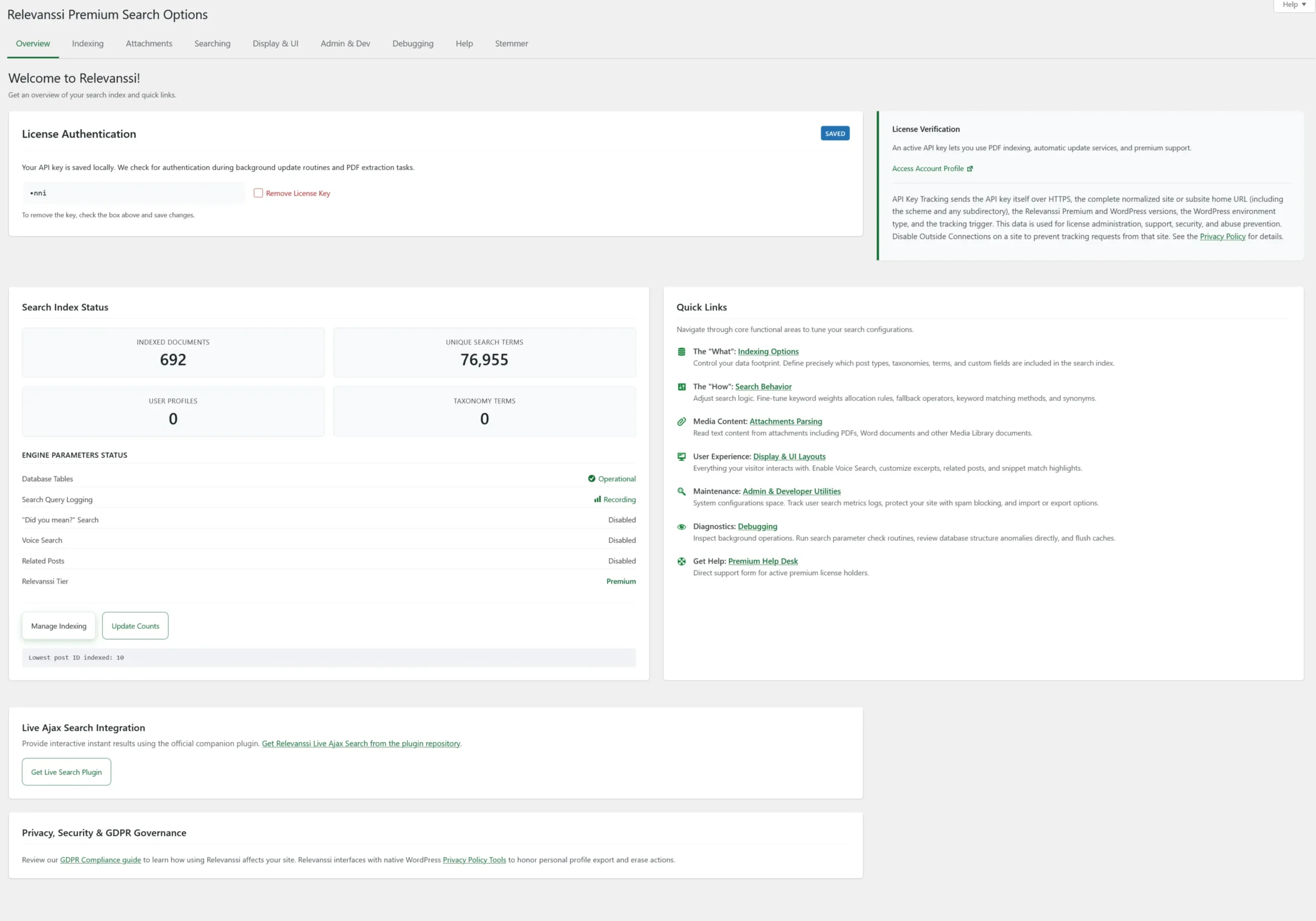
Overview tab: license and search index status
License Authentication manages your Premium API key, which is available in your Relevanssi account. The key is used for Premium services such as automatic updates and remote document reading. A saved key is masked; to remove it, select Remove License Key and save. Multisite installations use the network-level key setting.
Search Index Status shows document and unique-term counts, Premium user-profile and taxonomy-term counts, and indicators for features such as logging. The displayed post ID is the lowest post ID indexed. Use Update Counts to refresh these statistics; it does not rebuild the index.
Quick Links lead to the main settings areas. Overview also links to the Live Ajax Search companion plugin and privacy documentation. Editor visibility controls are under Admin & Dev, not Overview.
Premium installation registration can send the API key, site URL, plugin and WordPress versions, environment type, and registration trigger to Relevanssi.com. See the Privacy Policy and the Disable outside connections setting under Admin & Dev.
Indexing
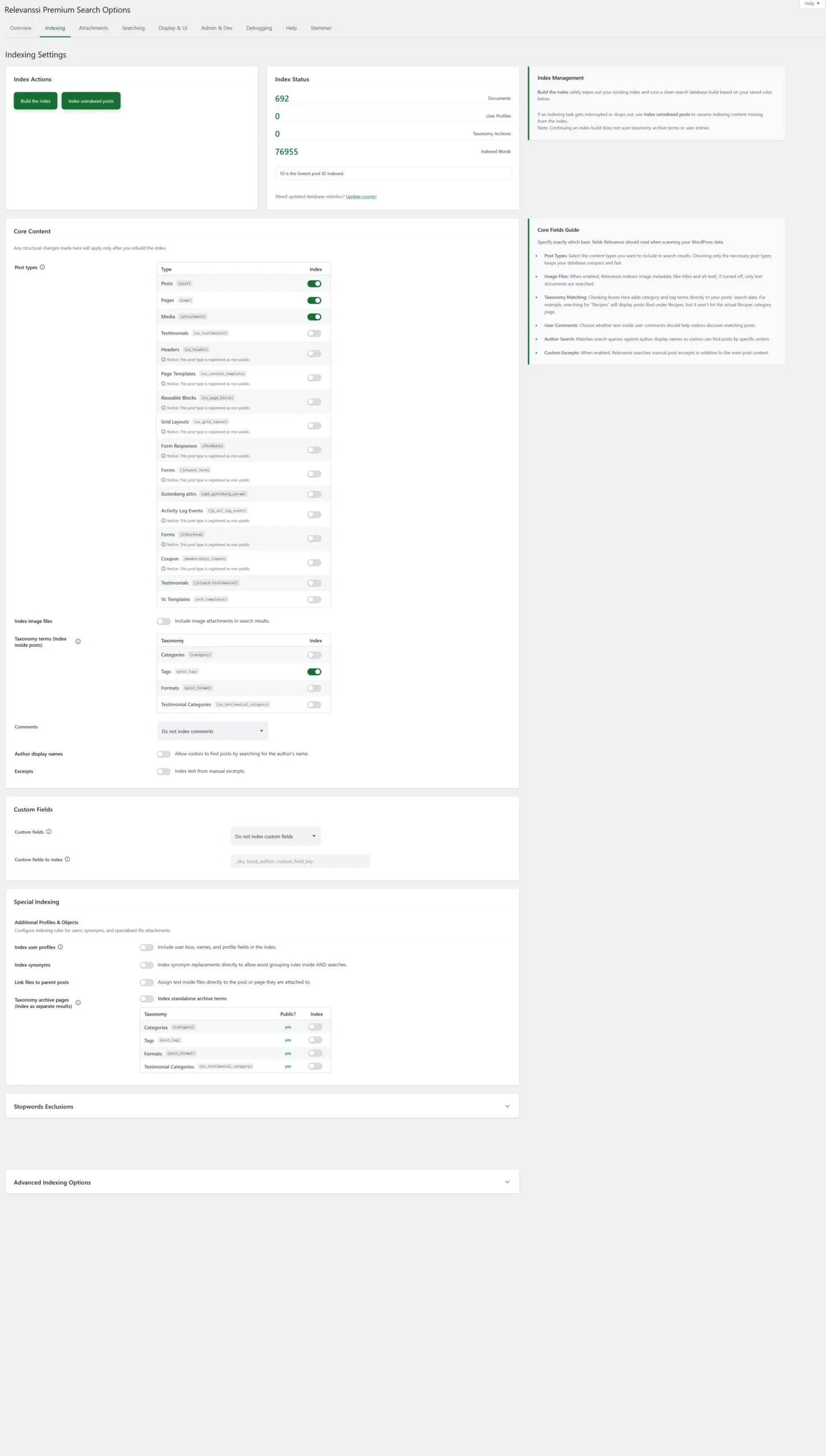
Indexing tab: content selection and index management
This tab determines what goes into the search index. Save changes to indexing rules and rebuild the index to apply them to existing content. Stopword actions are an exception: adding stopwords removes matching indexed terms immediately.
Index Actions and Index Status
Build the index clears the existing search index and rebuilds it using the saved configuration. It does not delete your WordPress posts. The progress display includes elapsed time and an estimated time remaining.
Index unindexed posts adds posts that are missing from the index. Use it after an interrupted build or an import that did not trigger normal indexing. It does not refresh posts already indexed and does not index Premium user profiles or taxonomy archives.
Index Status shows indexed documents, user profiles, taxonomy archives, indexed words, and the lowest indexed post ID. Refresh counts if the statistics need updating.
Core Content
- Post types: select Posts, Pages, Media, or any additional registered types you want indexed. The available list depends on your site. A notice can appear for types registered with
exclude_from_search; search visibility also depends on Respect exclude_from_search under Searching. - Index image files: shown when Media is selected. Controls whether image attachments are included. This does not turn image pixels into searchable text.
- Taxonomy terms (Index inside posts): adds the selected category, tag, or custom taxonomy term names to each associated post’s search data. This finds posts assigned to a term; it does not make the term archive a separate result.
- Comments: choose no comments, regular comments, or comments including trackbacks and pingbacks.
- Author display names: allows a search for an author’s display name to match that author’s posts.
- Excerpts: includes manually entered excerpts in the index. This is separate from generating snippets for search results.
Custom Fields
Custom fields offers four choices: no custom fields, all custom fields, visible fields only, or a specific list. “Visible” excludes field keys beginning with an underscore; it does not mean every field shown by an ACF or page-builder interface. Selecting specific fields gives you direct control over which data becomes searchable.
For a specific list, enter comma-separated keys in Custom fields to index, such as book_author, _sku. Hidden fields can be included explicitly. Premium supports ACF repeater subfields using fieldname_%_subfieldname. The detected-fields list appears when custom-field indexing is enabled. Avoid indexing internal configuration data unless it is actually useful for search.
Special Indexing (Premium only)
- Index user profiles: includes profile names and biography text as separate search results. When enabled, Index subscribers includes subscribers, and Extra user fields adds specified user metadata or user-table fields. Review which profile information should be searchable. Your results template may need adjustments to link correctly to profile pages. See User profile search.
- Index synonyms: adds configured synonym replacements during indexing, allowing synonyms to work with AND searches. Set the rules under Searching, save them, and rebuild the index when those indexing rules change.
- Link files to parent posts: includes extracted attachment text in the parent post’s index, so the parent can match a search for words inside the document. The file needs a parent assignment in WordPress. To return attachments as separate results too, select Media under Post types.
- Taxonomy archive pages (Index as separate results): includes the selected taxonomy archives as their own results. This is separate from indexing taxonomy names inside posts. Use a results template that supports their links. See Indexing taxonomy pages.
Stopwords Exclusions
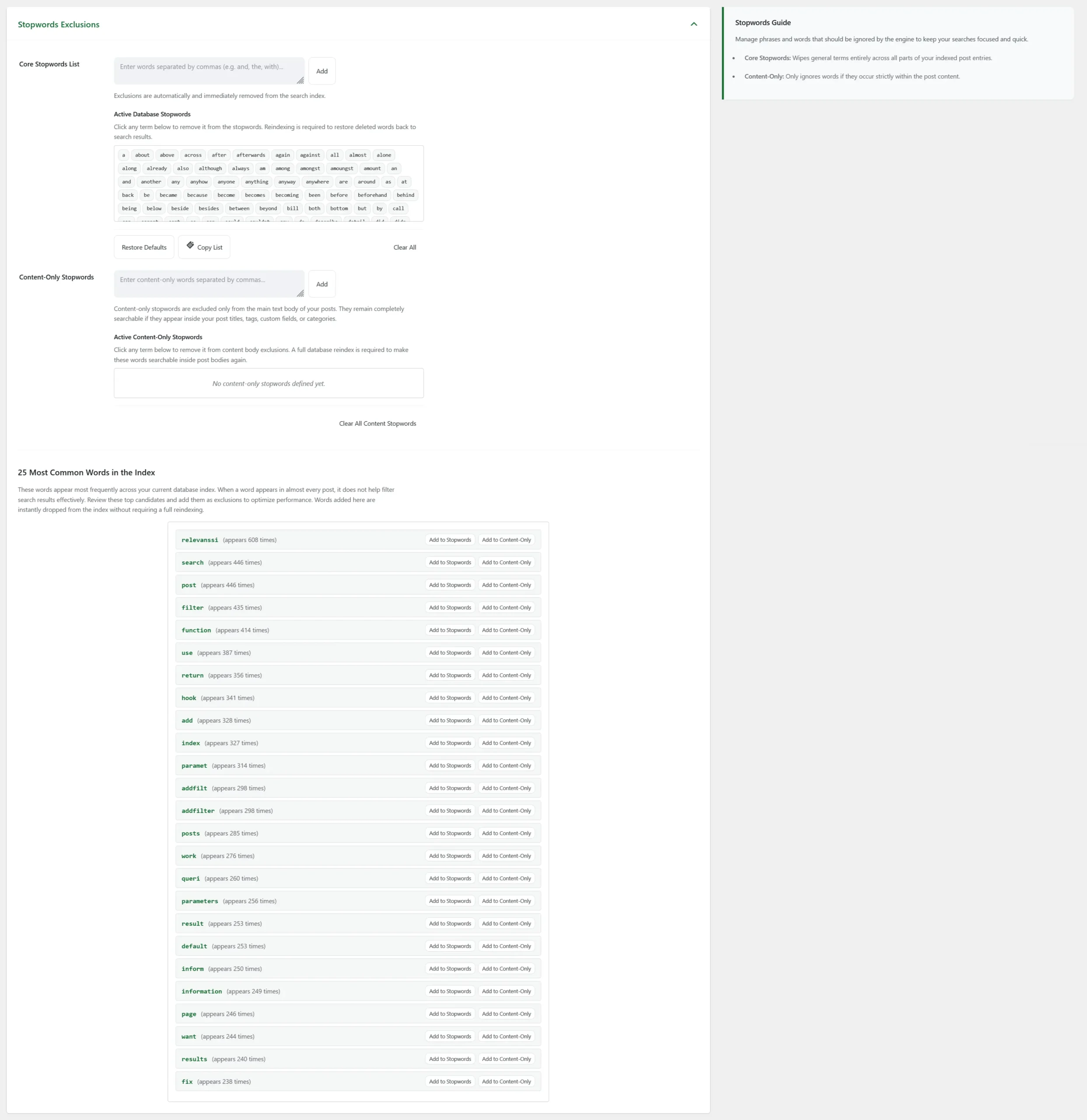
Indexing: Stopwords Exclusions
Expand Stopwords Exclusions to manage common terms that should be omitted from the index. The initial stopword list depends on your WordPress language.
Core Stopwords List applies across indexed fields. Add words using a comma-separated list. Adding a stopword immediately removes its indexed occurrences. Click an existing word to remove it from the stopword list, then rebuild the index to restore its occurrences in existing content.
Content-Only Stopwords (Premium only) removes words from the main post body while retaining matches in fields such as titles, categories, tags, or custom fields. Removing a content-only stopword also requires reindexing to restore body matches.
Premium also shows common indexed words with actions for adding them to either list. Choose exclusions based on your content and visitors’ searches; a frequent word can still be important.
Advanced Indexing Options
Expand this panel for shortcode execution, word-length limits, and punctuation rules.
- Expand shortcodes: executes shortcodes before indexing their output. Dynamic output is captured as it exists at indexing time. If indexing fails, check whether shortcode execution is responsible.
- Disable these shortcodes (Premium only): comma-separated shortcode tags, without brackets, to skip during indexing.
- Minimum word length: ignores shorter words. The default is 3; reduce it if important terms on your site are shorter, and rebuild.
- Punctuation control: defines how hyphens and dashes, apostrophes and quotes, ampersands, and decimal separators are handled. Replacing a symbol with a space separates words; removing it joins the surrounding characters. Available choices depend on the symbol type. Rebuild after changes.
- Thousands separator (Premium only): specifies a separator to remove from numbers during indexing, such as the space in
1 000. - MySQL columns (Premium only): adds named columns from the WordPress posts table to indexed content. These are database columns, not post-meta keys.
- Internal links (Premium only): leave anchor text with the source post, index it for the target document only, or index it for both source and target.
- Index post type archives (Premium only): includes custom post-type archive pages in the index.
Integration-specific controls can appear here, such as SEO Framework for respecting its local-search exclusion. Existing legacy exclusions may also be displayed with deprecation notices. They are not required for a new configuration.
Attachments (Premium only)
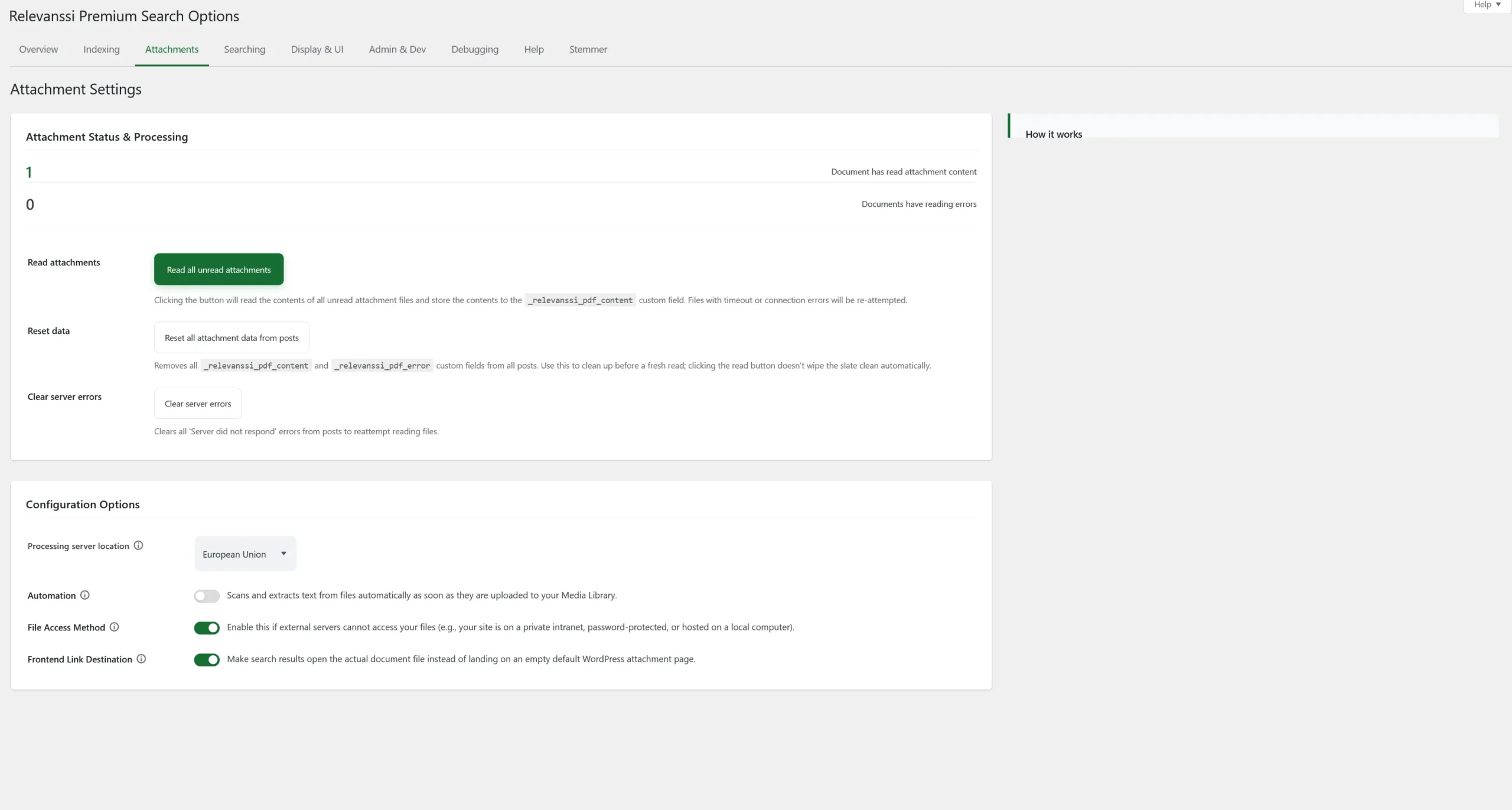
Attachments tab: document reading and configuration
This tab manages text extraction from Media Library documents. Reading a document stores its text in _relevanssi_pdf_content; processing errors are stored in _relevanssi_pdf_error. Extracted text must then be included in an indexed attachment or its indexed parent to produce search matches.
Supported document types include PDFs with a text layer, Word documents, OpenDocument files, RTF, and EPUB. Image-only scans need a searchable text layer first. The interface lists a 256 MB processing limit; WordPress upload limits and server resources may impose lower limits.
Remote processing: the default reading service processes document content outside your WordPress server. Select United States or European Union under Processing server location. Review the data-handling requirements for your documents before reading them. You can exclude individual attachments with the Relevanssi exclusion control on their edit screen.
Attachment Status & Processing
- Read all unread attachments: reads documents without stored text and retries eligible timeout or connection errors. It does not first delete previously extracted content.
- Reset all attachment data from posts: deletes the stored extraction content and error metadata. Use it only when you intend to read the documents again; it is not a search-index rebuild.
- Clear server errors: clears stored “Server did not respond” errors so affected files can be retried.
Configuration Options
- Processing server location: chooses the US or EU extraction service.
- Automation: enable this switch to read newly uploaded documents automatically.
- File Access Method: enable this switch if the reader cannot access a public document URL, for example on a private intranet. This uploads the file itself and still requires an outbound connection to the reader.
- Frontend Link Destination: enable this switch to open the file rather than its WordPress attachment page. This applies to attachment results, not parent-post results.
For standalone file results, select Media under Indexing. For parent-post results, enable Link files to parent posts and ensure the parent is indexed. To generate snippets from extracted document text, also enable Use custom field content for building excerpts under Display & UI.
Searching
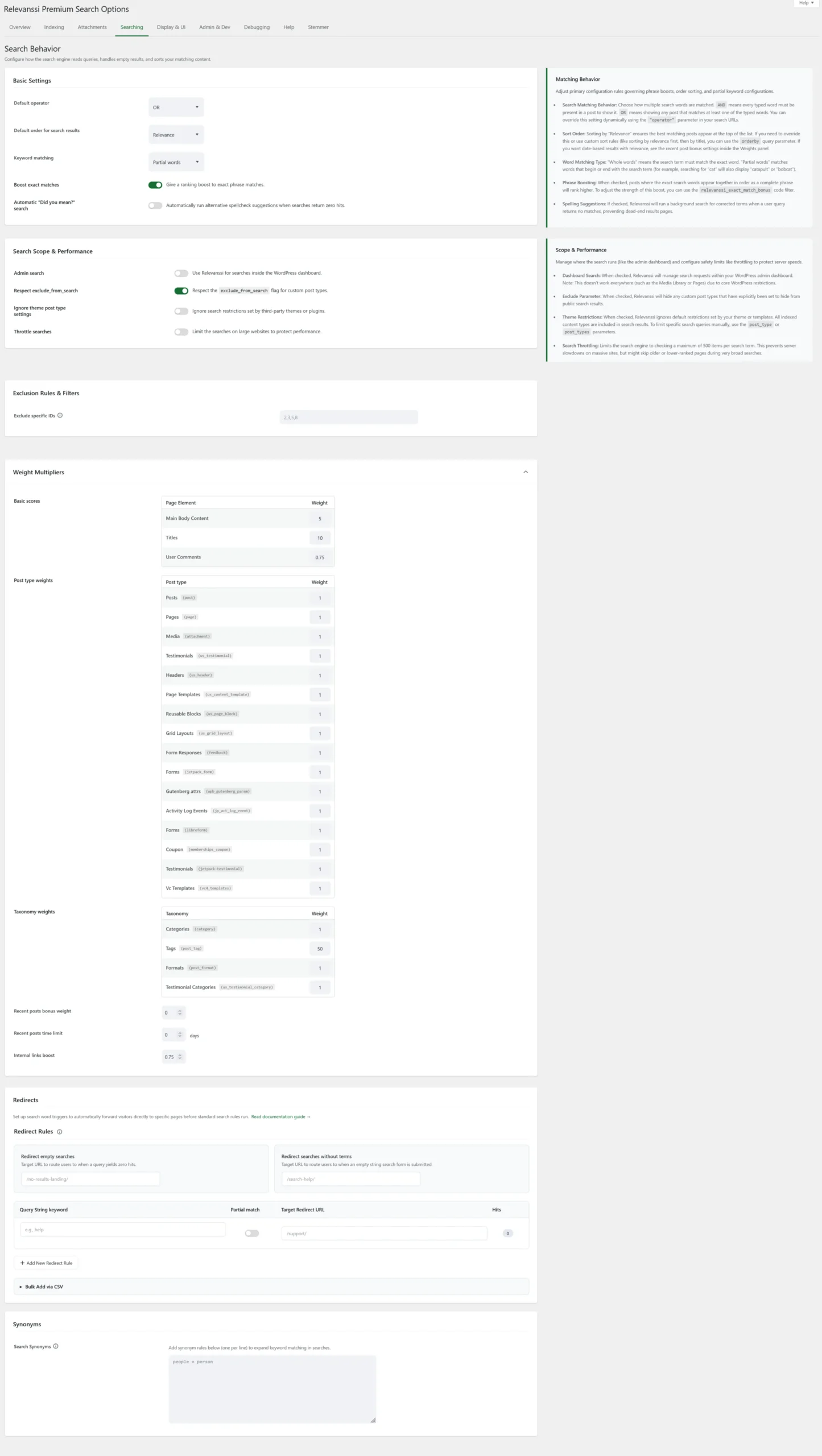
Searching tab: matching, scope, weights, and redirects
These controls govern query matching, search scope, and ranking. They generally apply after saving without rebuilding the index. Indexing synonyms is an exception because it changes indexed content.
Basic Settings
- Default operator: AND requires all search terms; OR allows results matching at least one term. Choose according to the searches your visitors make.
- Fallback to OR: shown when AND is selected. By default, an AND search with no results can retry as OR. The checkbox says “Disable the OR fallback”: checking it turns that retry off.
- Default order for search results: choose Relevance or Post date. A search query or template can override this with
orderby. - Keyword matching: “Whole words only” requires a complete word. “Partial words” matches word beginnings or endings:
catcan matchcatapultandbobcat. This is not arbitrary substring matching or automatic correction of misspellings. An older “Partial words if no hits for whole words” value may remain visible with a warning on existing installations. - Boost exact matches: gives an additional ranking bonus when the search terms occur together as an exact phrase.
- Automatic “Did you mean?” search (Premium only): when a query returns no results, attempts an alternative spelling-based search. A successful alternative depends on available suggestions and indexed content.
Search Scope & Performance
- Admin search: uses Relevanssi for supported WordPress admin searches. It does not replace every search tool in the dashboard.
- Respect exclude_from_search: respects post types registered as excluded from frontend search. Indexing such a type does not by itself override this control.
- Ignore theme post type settings: ignores the search query’s
post_typerestriction. Use Relevanssi’spost_typesparameter if you still need an explicit restriction, and test the result with your theme. - Throttle searches: limits candidate processing per search term, normally to 500 index matches. This can reduce memory use on large sites, but can omit candidates for broad searches. It does not set the number of results displayed per page.
If WPML or Polylang is active, language controls may appear. WPML Language Matching restricts results to the current language; Polylang Language Matching offers the option to show results from all languages. These controls have different checkbox meanings.
Exclusion Rules & Filters
Exclude specific IDs accepts comma-separated post or page IDs. Premium also provides a per-item exclusion checkbox in the editor that removes that item from the index. Older category restriction or exclusion controls are displayed only when corresponding saved settings exist; use query-level taxonomy restrictions for new custom search forms.
Weight Multipliers
Expand this panel to adjust the scores for main body content, titles, and comments. A multiplier of 1 is neutral; values above 1 increase importance, and values below 1 reduce it. Larger title weights can favor title matches, but do not guarantee that every title match will outrank every other result.
Premium adds post-type and taxonomy weights, with additional weights when standalone users or terms are indexed. Recent posts bonus weight sets a multiplier for newer posts; Recent posts time limit defines the age cutoff in days. Internal links boost adjusts the contribution of indexed incoming link text. Test changes against representative queries.
Redirects (Premium only)
Redirect Rules route specified search queries directly to a target URL instead of the normal results page. Each rule has a query string, an optional partial-match checkbox, a target URL, and a hit count. You can add, copy, remove, or bulk-add rules via CSV, then save the options.
Redirect empty searches defines a destination for searches with no hits. Redirect searches without terms applies when no search terms were entered. Redirect partial matching checks whether the configured text occurs inside the query; it is separate from word matching in the search index.
Synonyms

Searching: Synonyms
Enter one rule per line under Search Synonyms, using word = synonym. For example, dog = hound expands searches for “dog” to include “hound”. Rules are one-way; add hound = dog for the reverse direction. The left-hand search term must be one word; the replacement can contain several words.
Query-time synonyms are suited to OR searches. For AND searches, Premium’s Index synonyms setting under Indexing adds replacements to the index. Rebuild after enabling that option or changing the synonym rules used during indexing.
On Premium multisite installations, network search controls can appear for searching all subsites or a comma-separated list of subsite IDs. The searched sites need their own populated indexes.
Display & UI
This tab combines voice search, result snippets, highlighting, and related posts. The old separate “Excerpts and Highlights” tab is no longer the location of these controls.
Voice Search (Premium only in this interface)
Voice search enables microphone-based query entry in supported search forms and browsers. Voice search autosubmit submits the recognized query automatically; otherwise visitors can review it first. Voice search CSS loads the supplied styling, which can be replaced if it conflicts with your theme.
The feature uses the browser’s Web Speech API and may use an external speech-recognition service. Support, microphone permission, and a secure context affect availability. See Voice Search for technical details; the settings are under Display & UI in the interface described here.
Snippets & Excerpts Generation
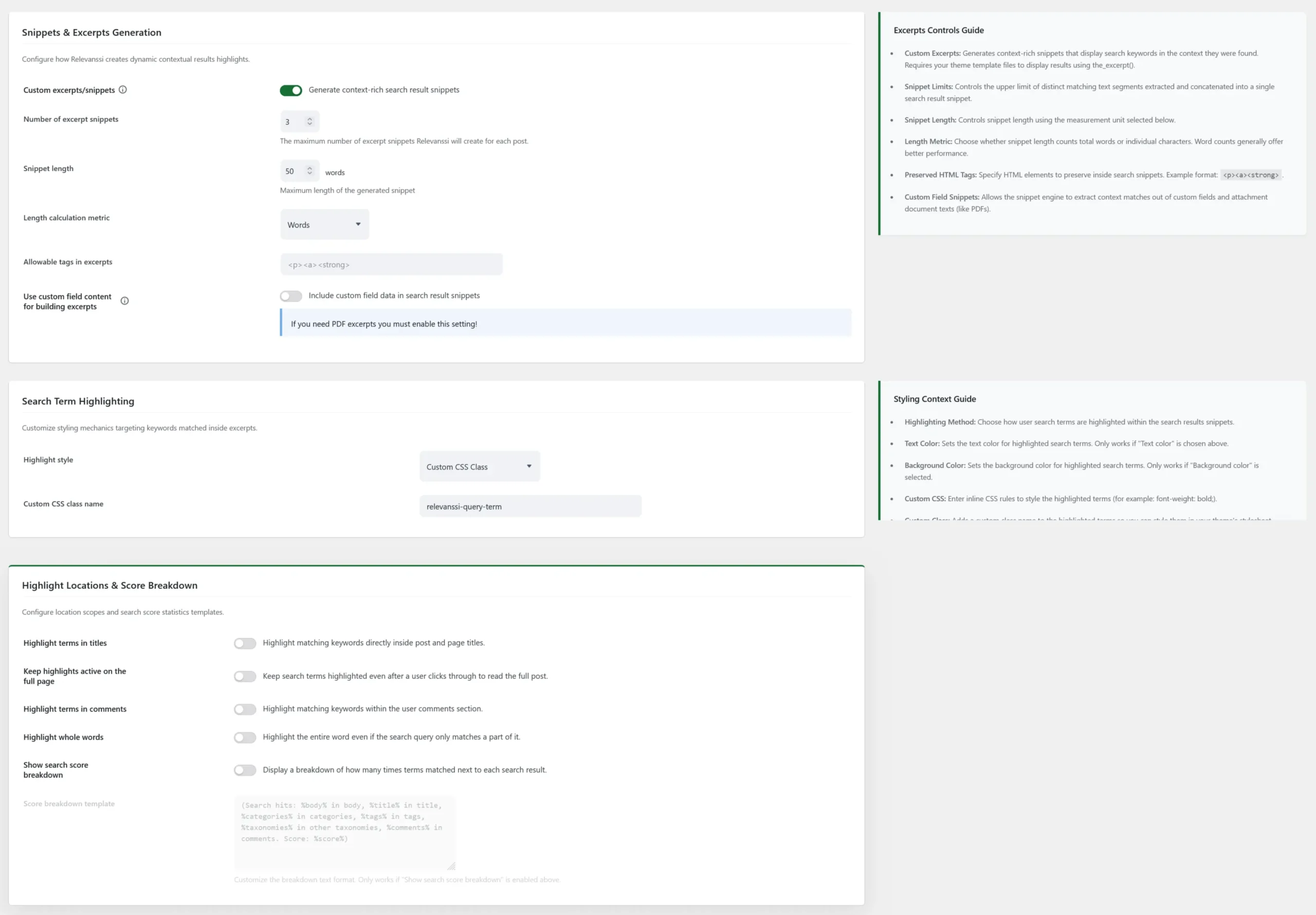
Display & UI: snippets and highlighting settings
- Custom excerpts/snippets: generates search-specific excerpts showing matching terms in context. Your results template must display excerpts, for example with
the_excerpt(). - Number of excerpt snippets (Premium only): maximum number of matching text segments combined for a result.
- Snippet length and Length calculation metric: control length in words or characters.
- Allowable tags in excerpts: HTML tags to preserve, such as
<p><a><strong>. Add only tags that suit your results layout. - Use custom field content for building excerpts: includes indexed custom-field text when generating excerpts. Enable this for snippets from extracted attachment text.
- Specific custom field excerpts (Premium only, shown when custom-field excerpts are enabled): limits which fields are used for building those excerpts.
Search Term Highlighting
Highlight style offers no highlighting, a <mark>, <em>, or <strong> tag, text or background color, inline CSS, or a custom CSS class. Color and CSS fields appear for the corresponding style. For a custom class, enter its name in Custom CSS class name and style that class in your theme.
Highlight Locations & Score Breakdown
- Highlight terms in titles: requires suitable template support. Replace
the_title()withrelevanssi_the_title()in a PHP search-results template. - Keep highlights active on the full page: highlights terms after visitors open a result. Result links must carry the search query, for example by using
relevanssi_get_permalink()in the template. - Highlight terms in comments: extends highlighting to comments.
- Highlight whole words: highlights the whole matching word when the query matches only part of it.
- Show search score breakdown: adds match counts and score information to excerpts. Score breakdown template controls the format using placeholders such as
%body%,%title%,%categories%,%tags%,%total%,%score%, and%terms%.
Related Posts (Premium only)
Enable related posts uses the Relevanssi index to find related content. Automatic injection selects the post types on which recommendations are appended. For manual placement, use the related-posts shortcode or template function instead. In a text block, enter ; in PHP, use relevanssi_related_posts().
Matching criteria chooses keyword sources such as titles and indexed taxonomies, and can restrict taxonomy-derived keywords to matching taxonomy fields. Select at least one source. Number of posts, Age limit in months, and Allowed post types control the recommendation pool; an age limit of 0 allows all ages. “Matching post type” limits recommendations to the current item’s type.
Fallback behavior handles no matches; Backfill behavior handles fewer matches than requested. Choose whether to show fewer items or fill the gaps with random or category-based items.
The layout controls cover Display titles, Display thumbnails, a Fallback image when thumbnails are enabled, Display excerpts, and Minimum item width in pixels. Related results are cached. Cache for administrators controls caching for admin visitors; selecting Clear related posts cache and saving clears stored recommendations so they can be generated again.
Admin & Dev
This tab contains editor visibility, external connections, spam blocking, search logs, click tracking, and settings migration. There are no separate Logging or Import / Export tabs in this interface.
Global Settings
- Hide Relevanssi meta boxes (Premium only): hides Relevanssi controls on post-edit and quick-edit screens.
- Keep visible for administrators (Premium only): keeps those controls available to administrators when hidden for other users.
- Disable outside connections (Premium only): disables Relevanssi’s external connections, affecting automatic updates, remote attachment reading, translation updates, and installation registration. It does not replace a site-wide network policy.
If Update translations appears, it refreshes the available Relevanssi translations. Its availability depends on the installation.
Spam Blocking (Premium only)
Block keywords accepts one entry per line. Block by regular expression accepts matching patterns, using the plugin’s case-insensitive Unicode delimiters. Maximum character limit rejects longer queries; 0 disables that limit. Additional switches block Chinese-character, Cyrillic-character, emoji, or recognized bot queries. Enable only rules appropriate for your audience: these can block legitimate visitors too. Blocked searches do not appear in the normal query logs.
User Query Logging and Log Maintenance
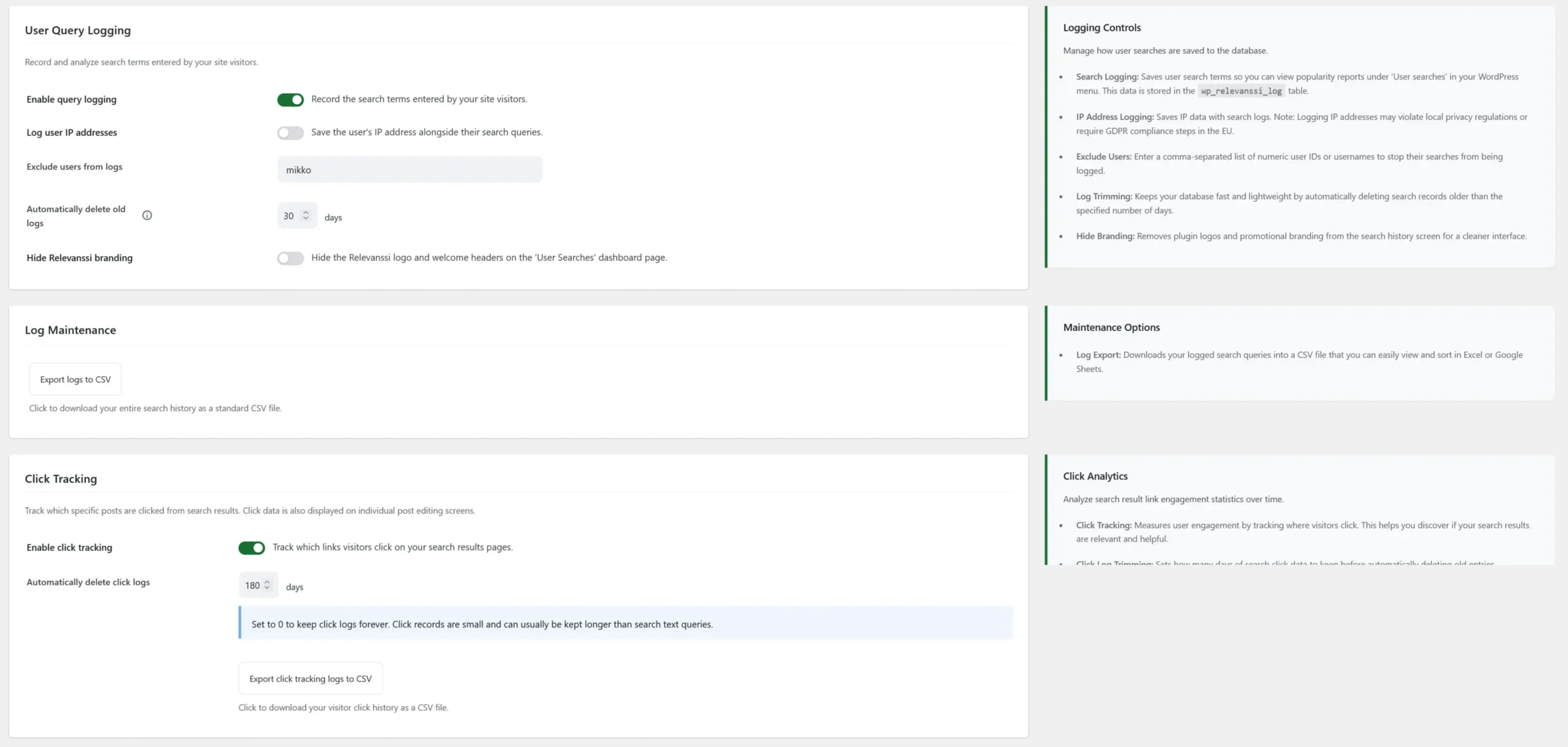
Admin & Dev: query logging, log maintenance, and click tracking
Enable query logging records search terms. View the reports under Relevanssi > User searches. Logs are stored in the WordPress database’s relevanssi_log table, using the site’s configured table prefix.
- Log user IP addresses: adds IP addresses to query logs. Consider the personal data being collected and document your handling in your site’s privacy information.
- Exclude users from logs: comma-separated user IDs or usernames, useful for omitting your own test searches.
- Automatically delete old logs: retention period in days; 0 disables automatic trimming.
- Hide Relevanssi branding: hides the logo and welcome headings on the User searches screen. It does not remove branding from the entire WordPress admin.
- Export logs to CSV: downloads the recorded search history.
Click Tracking (Premium only)
Enable click tracking records clicks on search results. Automatically delete click logs sets a separate retention period in days; 0 disables trimming. Export click tracking logs to CSV downloads those records. Test tracking with your results template and include this data collection in your site’s privacy review.
Import / Export Settings (Premium only)

Admin & Dev: Import / Export Settings
Export settings contains the exportable configuration as JSON text. Copy it to back up settings. To import, paste the exported text into the field and click Import settings. Use compatible versions, preferably the same version, and check the result after importing.
The export includes the API key and may contain site-specific IDs and URLs. Keep it private and review those values when migrating between sites. Importing settings does not copy posts, attachments, search logs, or the search index; rebuild the destination index after changing indexing rules.
Reset the relevanssi_words option clears the cached word list used for Premium spelling suggestions. Use Reset Cache Option if suggestions need refreshing. This does not rebuild the main search index.
Debugging
Inspect how Relevanssi reads your content takes an item ID and analyzes the text Relevanssi processes. Premium can also inspect a taxonomy term or user profile by selecting its Content Type. This is useful for investigating shortcode output and missing words.
Check how the post content appears in the wp_posts database shows the stored post content for an ID. It is a view of source content, not a report of every indexed match. Enable background debugging logs records diagnostic activity when troubleshooting search or indexing. The tab also shows the database indexing query and server packet-size information.
Help and additional tabs
Help links to the User Manual, Knowledge Base, Release Notes, and Premium account, and contains frequently asked questions. The Premium support form depends on license verification; review any diagnostic information before submitting a request.
Add-ons can add their own tabs. For example, Stemmer is provided by the separately installed Snowball Stemmer add-on. It is not a standard core tab.
Check your configuration
- Search for a distinctive word in a post title and another in its body.
- Try a multi-word query to confirm AND/OR behavior, and a word fragment to check partial matching.
- Check any indexed custom fields, document text, user profiles, or taxonomy archives that your visitors need.
- Confirm that snippets, highlighting, result links, and exclusions behave as expected in your theme.
- If a result is missing, check the selected post types, saved indexing rules, exclusions, and Debugging tools before adjusting weights.
After changing indexing rules, save and rebuild. After changing matching, display, or logging settings, save and test the affected behavior. Reading documents and submitting support requests require the relevant external services to be available.
159 Comments. Leave new
Hi, how can I change the placeholder text in Relevanssi? Thank you very much!
There’s no placeholder text in Relevanssi. The search form HTML comes from your theme, or WordPress core.
Hi, Mikko! I installed Relevanssi free version and do testing for fuzzy search – i typed Zirconia and get results, but when typed Zirconya, i do not get results(I have posts with post_title contains Zirconia). My question is – what i did wrong, why fuzzy serach do not work?
Alex, Relevanssi does not have a fuzzy search like that. The partial matching means that you can search for “zirconi” and find “zirconia”. If you need a search that fixes misspellings, you need Relevanssi Premium.
Sorry if this has been asked before… If I have multiple matches of my search terms in a post, is there any way I can have multiple snippets of the matches in my returned excerpt? (the_excerpt or relevanssi_the_excerpt). I seem to only get the first one…
Marco, the free version of Relevanssi gives you just one snippet (not the first one, but the best one); Relevanssi Premium can generate multiple snippets.
Hi Mikko,
First of thanks for the awesome plugin and respect for the great job!
I have 2 questions and I hope you can help 🙂
I’m running a Woocommerce store. There are products available in different colors. The thing is, the search query I’d like to show results for, is included only in the image title of the product variation. For example “green chair” is included in the title of the image of a variation of a product with the title “A dining chair with wooden legs”.
When the plugin is set to index “variations” it doesn’t return a result for that product at all because the title of the product doesn’t contain the query. When I include indexing of “attachments”, then results are returned, but if I have numerous product images in the main product gallery that include the search query in their names, the results include all of them which is user unfriendly.
Is there a way I can set the search to return results only of images that are manually set for the product variations, but not all images in the product gallery that contain the search query? That would be the most clean and relevant result. Of course I don’t wish to exclude from results main product pages that contain the query in their titles.
And one more question – I have thousands of attachments that are of assembly schemes that I don’t need to show in search results, but they include in their names different user queries and are shown on the results page. Is there a way to exclude such files? For example all those files include the word “scheme”. Can I exclude from results all files with “scheme” present in the title?
Thanks!
Dave, the image shown on the search results page has nothing to do with Relevanssi; it’s up to the search results template in your theme. You can modify the template to control which images are shown. It’s somewhat tricky to make the search show the image of the matching variation; I don’t have a ready solution for that.
Yes, you can exclude posts based on the title. See relevanssi_indexing_restriction for the best method.
Is there a way to exclude Private pages from showing in the Search Results in the free version?
Yes. You can use the relevanssi_valid_status filter hook to control which post statuses are included in the results. Note that Relevanssi should never show private posts in the results to users who can’t access them; if someone is seeing private posts they can’t access, something’s wrong.
Hi,
I am trying to get Relevanssi to work with the divi theme on wordpress. I use the divi search module.
This does not work. I added this code in my function.php of the child theme but the search results are only on the posts.
add_action( ‘pre_get_posts’, function() {
unset( $_GET[‘et_pb_searchform_submit’] );
}, 1 );
It’s very frustrating especially since I’ve just spent the day setting up the module and reading the docs.
What am I doing wrong?
Is there a special configuration? Can you please help me?
Thanks
Can Woocommerce products appear in order based on the individual item’s weight value which can be set manually?
Possibly a custom field’s value that overrides everything else?
thanks
Marwan, yes, you can do that. See orderby parameters in WP_Query. You can set
orderbytometa_value_numto sort the results by a custom field value.I’ve just installed relevanssi on https://csi.5in.in/ and basic search seems to work fine, the relevancy sort is great.
However I can’t seem to get synonyms to work. I’m trying to get searches for personla to show results including personal so entered:
personla =personal
knowlege=knowledge
but searching for personla still returns no results. Searching for personal returns results.
Any ideas?
And is there any general library of US/UK spelling synonyms available?
thanks,
Prachi
Looks like it’s working now, “personla” and “personal” return the same results. Were you perhaps using the AND search before? Synonyms require using the OR search.
I don’t know of general US/UK spelling synonym libraries, but I don’t know if it’s that useful anyway. You know the key vocabulary used on your site, stick to those words. Random unrelated words aren’t that important. If you enable search logging, you can see the most common unsuccessful searches, which will give you a solid clue of what kind of words you need to focus on.
How can I add the Relevanssi search engine to one of my pages?
The easiest way is using the search form shortcode, but you can use any standard search widget, too.
I made a mistake when I upgraded from free to premium on my test site—I deleted free Relevanssi, then installed Premium. Lesson learned.
But just to be clear, once I have installed Premium, *then* it’s okay to delete the free plugin, correct?
Nick, correct: the uninstall method in the free version is clever enough that it will check if Premium exists before deleting everything.
Is there a way to add a search bar somewhere in the WP admin area, so I can search all posts/pages at one time?
Mark, there’s Relevanssi search at Dashboard > Admin search.
Hi! I am using the Astra theme and Elementor Pro, which I created a Search Page template in. I clicked everything on the Index and built it, it says I have :
41 documents in the index.
3474 terms in the index.
84 is the lowest post ID indexed.
My site utilizes WordPress and WooCommerce. However, upon testing, the only search result I get back is the introductory post I’ve written, which was the issue before I uploaded Relevanssi as well. Furthermore, if I type in a random search term, it still pulls that same blog post, same as before, even though I know there is nothing about duck-billed platypuses on my site.
Thanks for your help!
Emily, the key here is the Search Page template: the Elementor Search Page templates are not compatible with Relevanssi. In order to be able to use Relevanssi, you need to use the plain WP search results template.
If possible, please contact Elementor and let them know that you’d like to be able to use Relevanssi with the Elementor Search Page templates. That won’t be possible until the Elementor people figure out that’s what their users want and add support for Relevanssi.
Did just that. After deactivating Relavanssi temporarily, I have the same issue. Something is up with Elementor, but it should definitely be compatible anyway! Thank you for your quick response. Stay healthy.
Hi there,
Does this plugin auto suggest words? For example, if I type in “Fo” could it show results for “Ford”?
Bobby, Relevanssi doesn’t have auto suggest feature, but it has partial word matching. If you search for “For”, it will match posts that have the word “Ford”.
I want to No Index my website Terms of Use page for the search engines but Index it in Relevanssi. When I add the No Index flag to the web page, it also becomes No Index for Relevanssi.
Is there a way to force indexing in Relevanssi even though the search engine No Index flag is set for a page or post? Thanks.
Jerry, if you’re using Yoast SEO, see these instructions. If you’re not using Yoast SEO, please let me know what you are using.
Yes, I am using Yoast SEO.
Thank you for the quick reply and the link to the code change needed to disregard the Yoast SEO “noindex” setting.
Best regards.
Hi, The highlighting is not working. I want it highlight the keywords found in search.
The options guide as this:
Highlights in titles require changes to the search results template. You need to replace the_title() in the search results template with relevanssi_the_title().
But I am not able to find the “the_title()”
I have searched whole wordpress files but I can’t find that tag,
Can you help me where I can change so it will work.
Thanks
Habib, which theme are you using?
I have the same issue and I’m using the Beaver Builder theme. Can’t find the_title() anywhere.
Denise, unfortunately I can’t help with Beaver.
Hi, we have a retail site and use WooCommerce. The products sku and full product code are different – because there are often variations within each product. If you search the sku (also the same as the quickcode in most products), it shows search results. If you try and search the full product code (layout 123.456.789.123) nothing comes up, saying no product found to match.
I’ve been through everything I can think of but still haven’t managed to make it search full product codes. At the minute the punctuation is set to remove.
Can you help? Is this a limitation or am I just missing something obvious?
Where is the full product code stored? If it’s in a custom field, is Relevanssi set to index that custom field?
Hi, I’m looking for a possibility to exclude text written in the header (logo claim) from search without including the search terms to stopp-words. Is there a way to exclude all content from the search that is not directly part of a page or post content?
Annika, the best solution depends on the case. Why is the content you want to exclude included in the post content in the first place? Is this some kind of page builder? Please post to the support forums with more details.
Just tracked down a (em) issue and wanted to report it. We have a few post titles that have (em) tags. When I searched for the exact title with quotation marks I was not getting any search results. When I searched for the exact title without quotation marks I did find it.
Did a little digging and figured out that the (em) tag had to be added to the title in the search box when I was using quotation marks.
For example:
Does not work: “Preparing for inquiries generated by Instant Family”
Works: “Preparing for inquiries generated by (em) Instant Family (em)”
None of our users would know to do this (not sure how many even search with quotation marks) but this bug was reported to me so I had to track it down. Can this be fixed in a future release? Thanks!
Tracy, it’s not really a bug, just a limitation in the search. When you do a phrase search with quotes, Relevanssi compares the search query against your database literally. If there’s a HTML tag in the text, it needs to be in the search query, otherwise there isn’t a match, because the search query doesn’t match the database literally.
There are two solutions for this, but unfortunately neither of them is feasible. One would be to strip the HTML tags on the go, but that takes way too much time and slows down the search to a crawl. The other would be to save a copy of the post content without the HTML tags somewhere, but that requires too much space in the database.
btw: could you allow or provide em and other highlighting code with a class? So I could use it elsewhere without further css hacks?
Please elaborate, I don’t understand the question.
I have a submenu in a template row/column that appears on every page. If someone searches for a word that happens to appear in the submenu too, every page is listed in the search results. Is there anyway to ensure Relevanssi doesn’t list irrelevant pages by letting me force it to ignore certain div blocks on the page?
For example, in the submenu, we have the word ‘Skincare’. If a user searches the word ‘Skincare’, even if a page has nothing to do with skincare (such as Digestive Health), it becomes listed.
I hope my question makes sense.
Best regards
Joe
Joe, it’s possible; the menu is probably added as a shortcode to the page, and if you block that shortcode from Relevanssi indexing, it won’t be indexed. If you can tell me how the submenu is added to the page (ie. which shortcode is used), I can help to remove it.
Hi Mikko,
Thank you for your last response , was very helpful. Just another quick couple questions, apologies if the answers are a bit obvious.
Is there any documentation I could read through that might help me learn how to limit a search to a specific part in our site (Q&A section)?
If we were then built the index, would it only index the terms in that specific part of the site (Q&A section)?
Thank you for all your help.
(I have attached a link to the section of the website incase that was useful)
Chris
It all depends on how the Q&A section is defined. It looks like it’s a page, so are we talking about indexing a page and all it’s children pages? Just “Q&A Section” doesn’t mean anything, the only thing that matters is how it is implemented in WordPress terms.
If you’re looking for indexing a page and its children, then you need to set up Relevanssi so that it only indexes pages. Then you need a filter on the
relevanssi_do_not_indexfilter hook that will see if the page being indexed is a child of the Q&A page or not. Something like this:add_filter( 'relevanssi_do_not_index', 'rlv_only_qa_children', 10, 2 ); function rlv_only_qa_children( $block, $post_id ) { $block = true; $parent = wp_get_post_parent_id( $post_id ); if ( 123 === $parent || 123 === $post_id ) { $block = false; } return $block; }Just replace “123” with the post ID of the Q&A page, and this will only allow Relevanssi to index that page and its children.
Hi, was looking to purchase Relevanssi but need to check:
1. Can the plugin only search a very specific part of our site (Q&A section). From what I have seen it looks like you can only specify whether pages or posts are searched, but not specific pages or posts or a specific section like our Q+A.
2. Can we define our own keywords (tags), without Relevanssi generating any automatically? This is because we want to have a single tag word for each topic, which users might search for with acronyms or synonyms. E.g. the tag “Mayer-Rokitansky-Küster-Hauser syndrome (MRKH)” can be found with full term, or acronym – or plural or any other possible synonyms – and can we define these synonyms in connection with keywords? In this e.g.,”Uterine Agenesis” has the same meaning but may not be named as such.
3. Can Relevanssi find search results for the keywords using our articles’ WordPress tags? I.e. an article we have tagged within WordPress as “Mayer-Rokitansky-Küster-Hauser syndrome (MRKH)” even if they don’t contain these terms.
Any help or additional information would be much appreciated! Plugin looks really great!
Chris
Chris, yes to all three! 1. is either very easy or slightly more complicated, depending on how the sections are set up. Limiting a search to a post type, category or certain page hierarchy is easy, for example.
2. Relevanssi doesn’t generate any keywords or tags. By default Relevanssi indexes post titles and post content, and you can enable other stuff, but you can also disable content and title searching if you only want to search tags. You can add synonyms.
3. Yes, Relevanssi can find posts by their tags, and can also find the tags themselves if you want to.
Hello! I was wondering with stopwords, if there’s a way to customize the message displayed so that it doesn’t show “no results.” – Or can I at least do that within my search.php results page?
Megan, that’s really up to your theme. Relevanssi has no control over the message, it comes from your theme.
Hi Mikko
First of all I would like to thank you for your plugin. It’s really helpful.
I just have a concern regarding the searching logic, I see that the logic considers the weight based on the tf value calculated which reflects the number of times the word is mentioned in a post. This approach could cause some confusion when a sentence containing a keyword present in most of the articles as the weight will give priority to the posts containing this specific keyword more than other posts containing the whole sentence but the keywords are not repeated. For my case, I preferred to adjust the weight through the words mentioned rarely by dividing the weight by the $matches->count and the tf value to focus on the posts containing more words of the searched sentence.
I did workaround on that through this function:
function adjust_match_weights($match, $idf, $term ) {
global $wpdb;
$term_count = $wpdb->get_var(“SELECT COUNT(term) from wp_ecrs_relevanssi WHERE term = ‘$term'”);
$match->weight = $match->weight / ($term_count * $match->tf);
return $match;
}
add_filter(‘relevanssi_match’,’adjust_match_weights’, 10, 3);
It’s working fine. However I needed to add a separate query for each term through the loop to get the $matches->count value as the hook relevanssi_match doesn’t included. I don’t think this is the best practice due to increasing the database queries when $matches->count was already accessed before. It can even be used if I updated the core but not through accessing the relevanssi_match filter. Could the $matches object be included in the apply_filters function in a next update?
Also regarding the synonyms, I noticed that if I added a synonym key and value it’s stored in the options table. However, if I came afterwards and wrote another synonym key and value it will overwrite the previous value in the database. I think that a simple concatenation function can solve this issue in the interface.php file.
Is there a concern changing this line:
$value = str_replace( $linefeeds, ‘;’, $_REQUEST[‘relevanssi_synonyms’] );
To be that way?
$value = get_options(‘relevanssi_synonyms’). “;”. str_replace( $linefeeds, ‘;’, $_REQUEST[‘relevanssi_synonyms’] );
I tried it and it worked, however there are no filters here which means that I need to update it in the core. If I did so, I will need to change it every time I update the plugin. Couldn’t this be incorporated in a next update?
Thanks
Mohamed, I’m not really catching the reasoning behind your weighting suggestion. The TF × IDF weighting has been an industry standard for 60 years and for a good reason; it generally works really well. If you want to make a post with a smaller weight for a particular keyword rank higher for that keyword, the easiest solution would be just to pin it using the pinning feature in Relevanssi Premium: that will guarantee first ranking in the search, without any additional code.
Your filter function is indeed not good for the performance: running all those extra queries will hurt the performance a lot. Why not use IDF instead? It’s already passed as the parameter to the filter, and while it’s not exactly the same as the term count you’re calculating, I think it’s generally the more useful number. Looking at the IDF is more helpful than the raw TF across the whole database, because the raw TF has no upper bound, while IDF has (the number of documents).
Passing the $matches array as a parameter to the filter doesn’t help, because there’s no $matches->count value in it – Relevanssi doesn’t calculate the raw TF.
Your suggested fix for the synonym interface would break it badly. Your change would make it impossible to ever remove synonyms, and the same synonyms would be duplicated many times every time the synonyms are saved. There’s no need to fetch the option value, because
$_REQUEST['relevanssi_synonyms']already includes all the synonyms, both old and new. If it doesn’t on your site, then there’s something wrong with the way your site works. It’s working as it is.If stopwords do not work because people are not looking for it – like the word Downloads (as we want to lead capture to those pages), but you have that keyword in a page title, can you exclude the page ID from search results somewhere?
With Relevanssi Premium, you could just check the “Exclude this post” box on the post edit page. With the free version, list the page ID in the “Post exclusion” setting on the searching page.
Is it possible to have more than one search on the same site using Relevanssi? We would like to have a site wide search and then on a calendar page have a search that would only return calendar items
Yes, you can have as many different search forms as you want. On the Relevanssi settings page, click the “Help” button on the top right corner and see “Helpful shortcodes” there for a method of creating extra search forms that only target specific posts.
Has Punctuation control been moved? I can’t seem to find it.
Ciaran, no, it’s still under “Advanced indexing settings” on the “Indexing” tab of Relevanssi settings.
Hi, Mikko
I was just wondering if it’s possible to make Relevanssi show results only when the beginning of the word matches the search term?
Algirdas, yes:
add_filter( 'relevanssi_fuzzy_query', 'rlv_only_beginning' );
function rlv_only_beginning( $query ) {
    return "(relevanssi.term LIKE '#term#%')";
}
Add this to your theme functions.php.
I was searching for its widget, when I guessed it could work with the existing search widget.
Indeed, there’s no Relevanssi search widget, because the default search widget is just fine.
Hello, Relevanssi was working fine, but after WPENGINE CDN, stopped working. Is it due to CDN and cache, right now the intended search page doesn’t show when clicked on search
Omer, CDN should have no effect on this; caching may, I suppose. No idea how that would actually have an effect.
Hi Mikko, thanks for a great plugin! I have a site running on WPEngine and Relevanssi worked fine there since installing it in May. After updating the plugin to the latest version I get 502 bad gateway errors from every search. After disabling Relevanssi the search feature works as expected (but obviously search results are not as good as with Relevanssi enabled). Have you heard others on WPEngine reporting this? Would love to help fix this problem!
Ville, no, this is the first complaint I’ve heard. What kind of settings you have, and how big is your database? 502 usually means the search is too heavy for the server.
Found a possible issue after some debugging.
The plugin seemed to crash in the Polylang compatibility filters (even though I don’t have Polylang installed). The real issue might still be related to WPEngine but after installing Polylang the search works again!
I’m happy debug a bit more in order to find out the real issue but at least I can enable the plugin again.
Polylang compatibility filters shouldn’t even load unless Polylang is installed. Does your site return true for
function_exists('pll_get_post')when Polylang is not installed? If Polylang compatibility runs when Polylang is not installed, I’m not surprised there’s a crash.Found the real issue after more digging.
The site used a theme that had some “helpful” Polylang fallbacks, just in case Polylang *isn’t* installed. Indeed the theme declares pll_get_post and some other Polylang functions if they don’t exist.
Happy to say that Relevanssi has nothing to do with this, this was a problem with the theme.
Hi,
I’ve added Relevanssi to our e-com site, yet I do not see any products when searched (with exact product tags). The search only shows blog post results. What am I missing? Thanks.
Raina, your theme is restricting the search results to posts. See “Search for other post types” on this manual page.
Hi there , I am using Relevanssi on my woocommerce website, I have enabled indexing product tags which it is doing fine the problem is it is reading space as a character like it gives 0 result for handmade but gives result for hand made which is a tag.
Kindly reply if its a bug or am I missing some thing..
Kind Regards
Sana, “handmade” and “hand made” are two different things, and Relevanssi can’t tell they’re the same thing. Relevanssi doesn’t understand language. Add a synonym “handmade=hand made” in the Synonym tab.
Thank you for the fast reply. I am using the download attachments plugin and for some reason that shortcode is not being ignored. The download attachments plugin has an issue with PHP 7.1+, but I am assuming that should not have an impact on indexing since it should not be rendering it at all. I setup a test site at http://avada.cfuser.com to troubleshoot the issue if you want to see it.
Stephen, since you’re a Premium customer, go to the support page and send me a support request there, with more details of the problem. What exactly is the problem with the shortcode?
Two questions.
1. What is the latest version of PHP you are supporting?
2. What is the correct format for ignoring shortcodes : basic or with all attributes e.g. [formidable] or [formidable id=”1″]?
Stephen, any PHP 7 versions should be fine. Oldest we support is 5.6.
Disable shortcodes using just the name of the shortcode, no attributes are necessary. It will disable all occasions, no matter the attributes.
Dear Relevannsi Team,
I am using your plugin and am happy so far. One question that came up is when looking at the search results page. That little “document” icon on the right of the search result, can this be deactivated. The user would arrive at the content page containing the seach term, clicking at the title of the page it was found on in the search results and via clicking this little icon. This are two links to the same and therefore might be a bit misleading. Can I deactivate that icon?
Thank you for your excellent work and plugin.
Best regards,
Max
Max, that is not a Relevanssi feature. It’s coming from your theme. You need to edit your theme search results template to fix the issue.
Not able to search the Chinese text..
Relevanssi is not indexing the Chinese posts..
Any luck..
If the Chinese text is in UTF-8, Relevanssi can read it and index it. However, Relevanssi simply does not work with Chinese or Japanese: these languages do not separate words in a way Relevanssi understands. Thus, even if you could index the contents, they wouldn’t make any sense. So unfortunately you have to forget about using Relevanssi with Chinese or Japanese.
Is there a way to prioritize pages over blog posts with the premium account?
Yes, Premium has post type weights you can use to make pages come on top. With both versions you can write code to sort results by post type: https://projekt77.ccsolution.at/knowledge-base/separating-posts-by-post-type/
With relevanssi enabled for admin search, I get no results, when I search my menu to find posts or pages. I need the admin search because I have 10,000 posts and relevanssi helps me get more accurate search results when looking for post name, so it is working great when just looking for posts in the general post section admin search, but when I want to find a post to add to my main menu (under appearance), the search brings back 0 results. Any ideas how to fix this?
Looks like this is some bug in Relevanssi. I’ll have to investigate. I’ll try to fix this for the next version of Relevanssi.
Hey! I’m not sure if you fixed this yet. I have the same problem when searching for pages in the actual pages section. Relevanssi turned on for admin simply returns 0 results.
Yes, this was fixed. Are you using the latest version of Relevanssi?
Could the problem be that the search functionality is going against form entries rather than a page with text?
Are those form entries posts in the WP database? If not, the answer is no.
No they aren’t posts – I’m new to this – so should I put the spreadsheet in a post somehow and just not show that post?
Please post your problem on Relevanssi support forums: https://wordpress.org/support/plugin/relevanssi
Explain what you’re trying to do, what should be found in searches and what not, and what is the exact nature of your problem. I don’t quite understand what is your problem now.
Installed relevanssi and can’t get the synonyms to work either. I have the default operator on “OR” so I can’t figure out what I’m doing wrong.
Is the search powered by Relevanssi in the first place? Does adjusting Relevanssi settings or disabling Relevanssi affect the results at all?
I thought installation and activation meant that Relevanssi would then enhance the existing search capability in WP. Is there something else I need to do to invoke Relevanssi searching?
Generally no, but some themes block Relevanssi from working and need extra work. Checking whether Relevanssi is actually powering the search is one of the basic debugging steps if you have problems with Relevanssi.
What are the extra steps? I’m using Forever Wood – is that a problem?
That’s the first I ever hear of that theme, so no idea. Try switching to one of the default themes – does the search work then? If it does, then the problem is likely your theme. If it doesn’t, then it’s something else.
But the easiest thing is to just disable Relevanssi and see if the results change. Do that first.
I am having trouble entering stopwords containing apostrophes. When I add “aren’t”, it displays as “aaren\\\’t”. Furthermore, if I click on it to remove, it won’t let me. Showing error msg: “Couldn’t remove term ‘aaren\\\\\\’t’ from stopwords!”
Thanks, will fix this in the next version.
Thanks for the update, Mikko. I am now able to add stopwords like “aren’t” but still can’t remove the old ones, same error. Any suggestions? Perhaps manually remove them from the DB?
Yeah, manual is probably the best.
I’m newbie with installing wordpress script. Is this a way that I can add this pluggin into my menu nav?
Thanks!
Here’s how you can add a search box to a WP nav menu: https://wordpress.org/support/topic/add-search-box-to-nav-menu
Hi,
i would like to disable indexing of post excerpts. Is it possible?
It’s an option you need to enable in Relevanssi settings in the first place.
I did, but post excerpts are still indexed and this is a problem for me. Can you think of anything that went wrong?
Thank you
Have you rebuilt the index after adjusting the setting?
Can I create multiple search boxes with different setting? So on certain pages I want the search bar to be restricted to a set of categories, but for the search bar everywhere else I want it to search site-wide?
Yes, you can.
Hi! Is there any documentation on how to do this?
No, not in particular, but there’s not much need, either. Just create a search form that has a category parameter (hidden input field named “cat”; for exact parameters see WP_Query documentation in WP Codex), then create another search form with different parameters, and place those as you see fit.
That helps! Thank you.
Hi Mikko,
Thank you for creating this great plugin! Your work is benefiting a lot of WordPress users.
Just a small question…
I checked the box for highlighting query results in titles, but somehow no difference is shown. My site runs on the Genesis framework with a StudioPress child theme. The URL for you to test is:
http://hashimnaushahi.com
I haven’t got any posts of myself on it yet, just some demo posts. So you can try searching for ’email’ or ‘mobile’ to see how the results look like.
Could you help me out with this?
Thank you in advance!
Sincerely,
Hashim
Hi, highlighting in titles requires changes in templates. Unfortunately, since you use Genesis, you’re pretty much out of luck, unless you’re skilled in Genesis template editing – it’s not an easy thing to do. You’d have to change the_title() functions in the template to relevanssi_the_title() – a very simple thing, but rather complicated with Genesis.
I am trying to exclude some pages with “Exclude these posts/pages from search:”. But it doesn’t work. Pages continue appearing on searches. These pages would be “635, 298, 639, 379, 294, 668, 1782, 147, 2920, 2874”. Some solution?
Are you running the latest version of Relevanssi? Are you sure that your search results are coming from Relevanssi?
Versión 3.3.5. I am not sure at all, but I think It’s running via Relevanssi. Our web is tavad.com. Can u check?
I can’t even get to a search results page from the search.
And how can I be sure the website is using relevanssi? I have added the code in functions.php and after that, shown results have been different to WP results
What code did you add? Relevanssi shouldn’t require you to add any code, anywhere. Also, do you have working search on your site somewhere? When I try to use the search on your home page, I don’t get any results page at all, I just get the home page.
I have added http://abcnews.go.com/US/millionaire-hiding-envelopes-cash-san-francisco/story?id=23871103 due to I am using an Enfold Theme. It’s on Top-Right. You can try to search “tratamiento cocaina”.
Ok, now I’m seeing a search results page. Looks like Relevanssi, yes. As for the exclusion not working – I’m not sure. There shouldn’t be any reason for it not to work; I just tested it on my test blog, and the feature works just fine.
Ok. Could it be due to Enfold theme?
[…] to get a really detailed overview of how the plugin works and in which ways it can be customised, the documentation from the developer comes highly […]
I’m not certain if this is something I could use the synonyms feature for but when I search the word S&P I only get searches for the letter S and the letter P. Is there a way to treat the ampersand as part of the word? There are hundreds of posts with the word S&P in them.
Bad_Self, read this post: http://www.relevanssi.com/knowledge-base/words-ampersands-cant-found/
Hi Mikko. My client would like the search results to show the relevancy score,YET have the results displayed by DATE. I have selected this option in the settings: Default order for results: POST DATE. But it is still displaying by RELEVANCE. Any thoughts? can you help?
No idea, changing the setting should change the order immediately. Displaying the relevancy score should have nothing to do with that.
I can’t seem to get synonyms to work either. I’ve entered
obits=obituaries
But I still get 0 results if I search on “obits,” even though “obituaries” gets pages and pages of results.
Any thoughts? Am I entering it in the box wrong — do I need quotes or anything? The method I’ve been trying is word pairs, 1 to a line. Should I comma delineate?
Thanks so much.
Are you using OR search? Synonyms don’t work in AND search. The format is correct.
OH I get it now. Yes, I was using AND search. In your previous answers I wasn’t realizing you meant as a total setting, not an individual query. Sorry about that! And thanks.
For me do not work. I using WordPress 3.5.2. Nothing happend when i type something. What can i do?
What do you mean “nothing happened”? Does your blog load the search page at all?
Type here http://truliluli.ro/ if the plugin work please.
Looks like the search works on that site.
Where did you check that?
Did you use the search box in the header and it works?
Yeah, the search box worked just as expected, and the results seemed sensible: http://truliluli.ro/?s=sherlock
Hmmm, but do not work like here http://www.mindtheproduct.com or here http://www.filmsforaction.org/ for example … And i dont understand why
Should not work the same?
No, that’s not Relevanssi. Relevanssi doesn’t have an AJAX dropdown search.
Oh … ok thats the problem :0 thank you mister.
I’ve just installed relevanssi on http://www.mindtheproduct.com and basic search seems to work fine, the relevancy sort is great.
However I can’t seem to get synonyms to work. I’m trying to get searches for prioritization to show results including prioritisation so entered:
prioritization=prioritisation
prioritisation=prioritization
but searching for prioritization still returns no results. Searching for prioritisation returns about 10 results.
Any ideas?
And is there any general library of US/UK spelling synonyms available?
thanks,
Martin
Can you say me what AJAX dropdown search plugin use http://www.mindtheproduct.com?
Thank you.
Dave’s WordPress Live Search, which as far as I can tell is not compatible with Relevanssi.
Thank you Mikko, but thats not good if the plugin is not compatible with relevanssi
Are you using OR search? Synonyms don’t work in AND search.
I don’t know of such synonym library.
Hi Mikko, is it possible to add more than 1 synonym to 1 word for example “red=rouge,rot,rod “?
Thanks,
Alex
Yes, but this way:
red=rouge
red=rot
red=rod
I am sorry to use your time, I have not have any issues but, is there a way to customize or personalize the output? I have created a Search page in WP but that does not affect the search page produced by the widget, I do not see any tab or way to access this and modify it in Elementor
Jose, can’t really help with Elementor, I don’t know much about that. Outside Elementor, the way to modify the search results output is to modify the search results template, and you can do pretty much anything you want with that.
Hi Mikko, I just tried to install the free version but am not seeing any changes in the search widget. I have a premium theme from Solostream (Wp-Mysterious) and also I have checked the “Use Search for Admin” box. What do I need to do to get this to work?
It may be your theme is incompatible with Relevanssi. The search widget shouldn’t change, but after installing Relevanssi and building the index, you should see different search results. Read this: https://projekt77.ccsolution.at/knowledge-base/query_posts/
Nope, there is no “query_posts()” in the “search.php” file for the Wp-Mysterious theme. Can you recommend another advanced search plugin that might work? Specifically one that allows users to search within certain categories or for posts that carry certain tags. Or might you be able to tell me what search plugin the website http://www.filmsforaction.org is using? That would be ideal. Thanks!
I have the same with another theme from Solostream.
The search result page stays the same.
The suspicious code into search.php is reported below:
====
===
Hi, What can I do if my theme has no search functionality? http://themeforest.net/item/heal-responsive-medical-wordpress-theme/3127829?sso?WT.ac=search_item&WT.seg_1=search_item&WT.z_author=raybreaker
Just add it. WP under the theme has search functionality, theme can’t overrule it. Just copy the search form from any WP site – it’s a GET form that has the search terms in an input field ‘s’. Then it’s just a question of setting up a search results template, if the default doesn’t work.
So, with your theme, we just use the default search widget? Or…do we add it somewhere? This could be made more clear in the documentation for us n00b users. You went in depth on everything else – but this.
Yes, just use the default search widget. It is not mentioned, because in most cases, you really have to do nothing – just use the search widget your theme already has, and most themes do have one.
It’s still incredibly confusing. Most plugins come with their own widget, so not mentioning it at all, anywhere, is not really helping 🙂
[…] As per all plugins, settings depend on the individual website. The default settings on Relevanssi are more than adequate for most sites. Read through the settings page as its very well explained. Here is a link to the Relevanss website which explains all the settings. Relevanss Site. […]