

Installing relevanssi is simple.
Installing instructions
Installing Relevanssi is simple. For the free version, install the latest version directly from the WordPress.org plugin repository.
For Premium, download the latest version from Relevanssi.com and either upload the zip file using the WordPress plugin installation interface, or unzip it and upload the files via FTP into the /wp-content/plugins/ directory.
After installing, navigate to Settings > Relevanssi to adjust your configuration and build the index.
Upgrading from Free to Premium
Important: When deactivating the free version, do not delete it yet. Deleting the free plugin will remove the database and all your customized settings!
- Deactivate the free version.
- Upload Relevanssi Premium.
- Activate Premium.
- Adjust your settings and rebuild the index.
- Safely delete the free version.
Search Widget
Relevanssi doesn’t come with a dedicated search widget. You can use the default WordPress search widget or any other method that generates a standards-compliant search form.
Overview
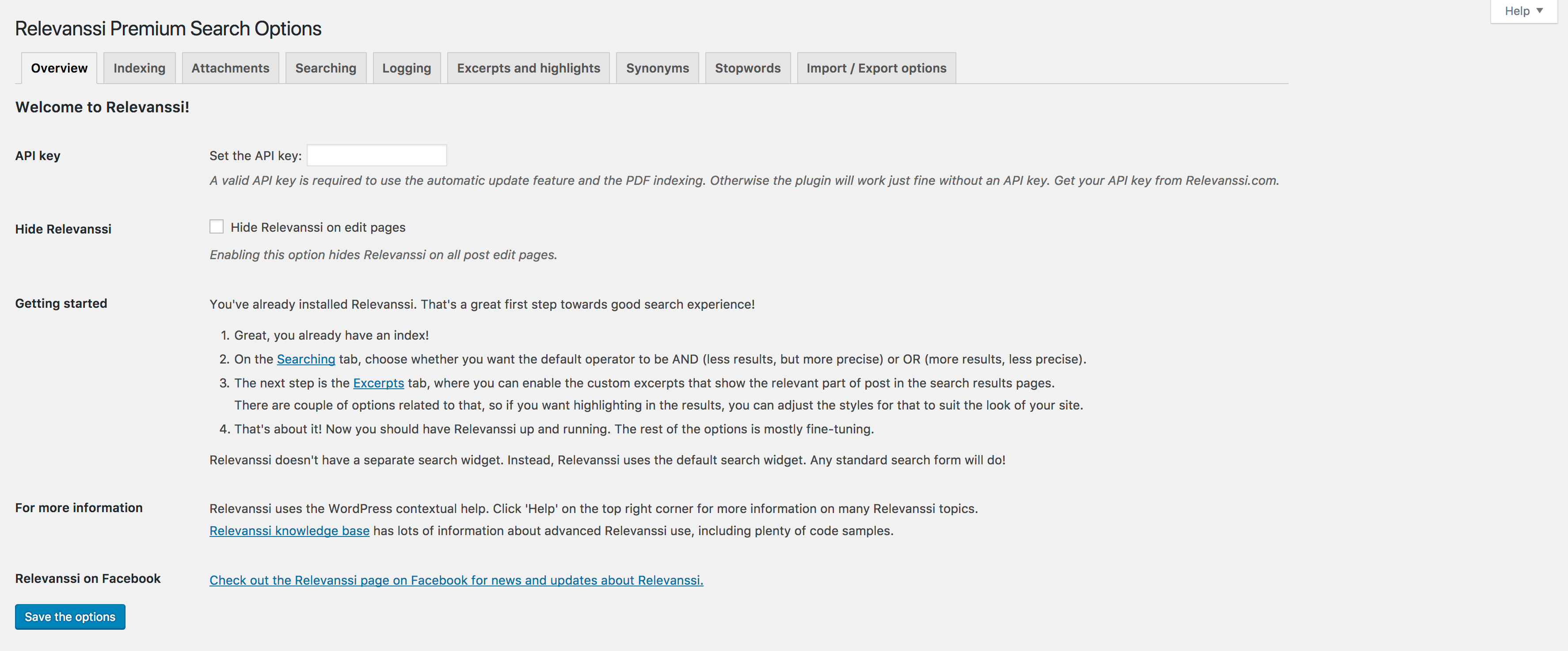
Overview tab
On the overview tab, you’ll find the API key setting (Premium only). If you’re on a multisite network, the API key field is located in the Network admin dashboard instead.
Enter your API key here to enable automatic updates and PDF indexing. Your API key can be found on Relevanssi.com in the sidebar when you are logged in.
Hide Relevanssi on edit pages (Premium only) hides all Relevanssi meta boxes and settings from individual post edit pages.
Indexing

Indexing tab
All options on this tab affect the core index and won’t take effect until you build it. You must save your options before indexing. Clicking Build the index will wipe the existing index clean and rebuild it from scratch based on your settings.
Note: Indexing can take a while, especially on large sites, but the process will show an estimate of the remaining time. Keep the browser window open as long as it takes to finish.
If for some reason the indexing is interrupted, you can click Index unindexed posts. This will index all remaining documents. This button is also extremely useful if you import posts in a way that doesn’t trigger standard Relevanssi indexing—just click it after the import to index the new content.
State of the index shows the number of documents (posts, pages), users, and taxonomy terms (Premium only) in the index, the total number of words, and the highest post ID. These statistics are useful for debugging to ensure indexing is working correctly.
Post types
Check the boxes for each post type you wish to include. The “Excluded from search?” column shows whether the post type is marked public or not, but it doesn’t restrict you from indexing them. It’s simply informational.
Taxonomies
Choose which taxonomies to index. Checking a taxonomy means that searching for a term name will return all posts attached to that term.
Comments
Choose which comments are indexed. You can include regular comments, or also include pingbacks and trackbacks.
Custom fields
Choose which custom fields are indexed. “All” includes everything assigned to a post, while “visible” only indexes fields shown on the edit page (excluding hidden fields that start with an underscore _). Since some themes inject heavy background data into custom fields, “visible” is usually the safest setting. You can also explicitly list specific fields. Note: Relevanssi Premium supports ACF repeater fields using the fieldname_%_subfieldname notation.
Author display names
If enabled, Relevanssi indexes author display names, allowing users to find all posts written by a specific author by searching their name.
Excerpts
If enabled, Relevanssi will index post excerpts.
Expand shortcodes
If checked, Relevanssi will process and expand all shortcodes in the post content before indexing. This means shortcode content is searchable! However, if a shortcode provides heavily dynamic content, Relevanssi will only index what was output at the exact moment of indexing. If you experience indexing crashes, disabling this option is the first troubleshooting step.
Disable these shortcodes (Premium only)
If a specific shortcode causes indexing issues, list it here to disable it specifically during the indexing process.
Index user profiles (Premium only)
If checked, Relevanssi indexes the first name, last name, display name, and user description. Since WordPress expects search results to be posts, Relevanssi temporarily converts user profiles to posts for the search loop. You may need minor template adjustments (using the_permalink()) to point to user profiles correctly. See User profile search.
Index subscribers (Premium only)
If checked, subscribers are also indexed alongside admins, editors, authors, and contributors.
Extra fields (Premium only)
List any extra user fields you want indexed here. Field names should correspond to MySQL columns in the wp_user table or user custom fields.
Index synonyms (Premium only)
Synonyms generally only work in OR searches by expanding the query. Enabling this option forces Relevanssi to physically index the synonyms as part of the post content, making them compatible with strict AND searches.
Index taxonomy terms (Premium only)
If enabled, searching for a taxonomy term name will return the actual term archive page as a result. Use relevanssi_get_permalink() or the_permalink() in your results template to ensure the link works. See Indexing taxonomy pages.
Index for parent (Premium only)
If checked, Relevanssi indexes PDF content for both the attachment itself and its parent post.
Advanced Indexing Settings
Minimum word length
Words shorter than this integer are ignored. The default of 3 is optimal for English.
Punctuation control
By default, Relevanssi removes some punctuation completely and replaces the rest with spaces. Here you can define specific rules for ampersands, hyphens, dashes, apostrophes, and quotes.
Thousands separator (Premium only)
Useful for indexing large numbers, particularly in languages where the thousands separator is a space (e.g., “1 000 000” becomes “1000000”).
MySQL columns (Premium only)
If a plugin writes data into a custom column in the wp_posts table, enter the column name here to index it.
Internal links (Premium only)
Choose how Relevanssi handles internal links. By default (“No special processing”), link anchor text is indexed as part of the current post. If set to “Index internal links for target documents only”, the anchor text is indexed as if it belonged to the destination page.
Attachments (Premium only)
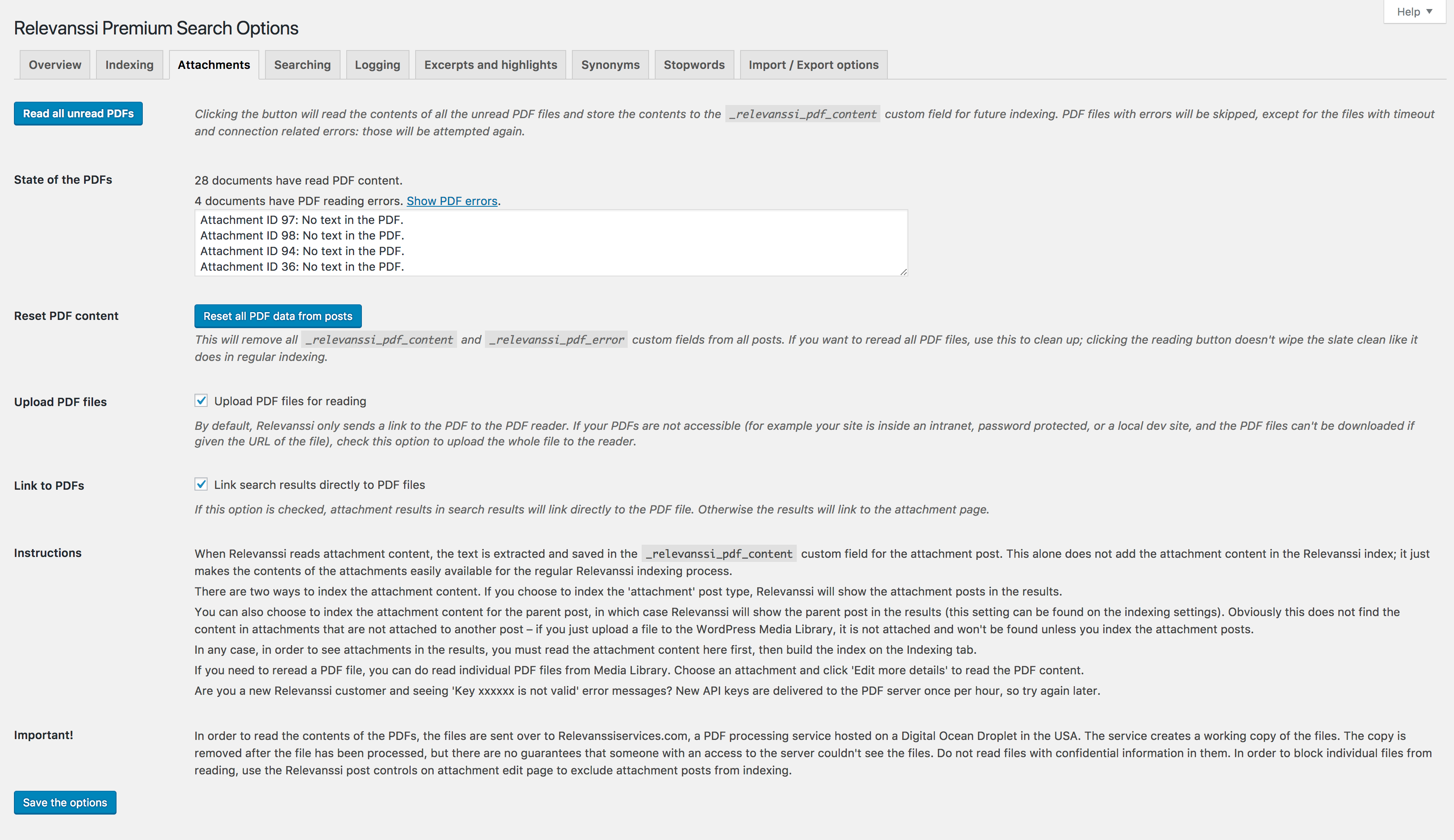
Attachments tab
The Attachment tab manages PDF content reading. If you have PDFs in your Media Library, Relevanssi can extract their text and make them searchable.
Privacy Warning: To read PDF contents, files are sent to an external Apache Tika server (hosted by UpCloud in the US or Germany). The working copy is deleted immediately after processing, but do not process files containing highly confidential information. You can manually exclude sensitive attachment posts from indexing via the WP edit screen.
Read all unread PDFs processes only PDFs that haven’t been read yet without wiping your current index.
Reset all PDF data from the posts will empty out the PDF information stored in attachment metadata (_relevanssi_pdf_content and _relevanssi_pdf_error).
Upload PDF files
By default, Relevanssi sends a link to the reading service to download the file. If your site is behind a firewall or on an intranet, check this option to have Relevanssi upload the file directly to the reader.
Link to PDFs
If you include attachments in search results, the default WP link goes to the attachment template page. Enabling this option bypasses that page and links directly to the raw PDF file.
Searching

Searching tab
Default operator
An OR search returns all posts containing at least one term (prioritizing posts with all terms). An AND search strictly requires all terms to be present. In most cases, OR provides a better user experience.
Fallback to OR
If you use AND as your default and a user searches for a query that yields zero results, Relevanssi will automatically fall back to an OR search.
Default order
Relevanssi orders by relevance by default. You can change this to sort by post date, or use the orderby parameter in your template for complex array sorting.
Keyword matching
“Whole words” strictly matches complete words (searching “ledge” only finds “ledge”). “Partial words” will match fragments, so “ledge” will successfully find “knowledge” and “ledger”. Note: The search term must be at the beginning or end of the word.
Weights
Adjust multipliers for specific features (titles, tags, comments, etc.). A weight of 1 is neutral. Values over 1 increase importance.
Pro Tip: Don’t be afraid to use big numbers! If you want to ensure title matches always appear first, slap a weight of 100 or 1,000 on titles. Subtlety is overrated when it comes to search weights.
Recent posts bonus cutoff (Premium only)
Determines what constitutes a “recent post” if you have applied weight bonuses to newer content.
Admin search
Enable this to use Relevanssi for backend WordPress admin searches.
Throttle searches
On large sites, searches with common words can consume massive amounts of memory. This option restricts Relevanssi to processing only the top 500 best-matching posts per search term before stopping. We highly recommend enabling this on large sites.
Category restriction & exclusion
Permanently restrict or exclude specific categories. Note that using the cats input field directly in your search form is a more flexible way to handle this.
Post exclusion
Permanently exclude posts or pages by entering their numeric IDs.
Search all / some subsites
Forces the search to span across your entire multisite network, or a specific comma-separated list of blog IDs.
Logging

Logging tab
Keep a log of user queries
Logs are stored under Dashboard > User Searches. Note: Logging is required for the “Did you mean” function to work in the free version.
Legal Warning: Enabling Log user IP may be illegal in your jurisdiction without explicit user consent, or may require GDPR disclosures. IPs are stored in the
wp_relevanssi_log database table.
Exclude users
Prevent your own searches from skewing the logs by adding a comma-separated list of user IDs or usernames here.
Hide Relevanssi branding (Premium only)
Removes Relevanssi branding from the admin interface—perfect for white-labeling client sites.
Trim logs & Export logs
Automatically delete logs older than a specific number of days to save database space, or export your logs as a CSV.
Excerpts and Highlights
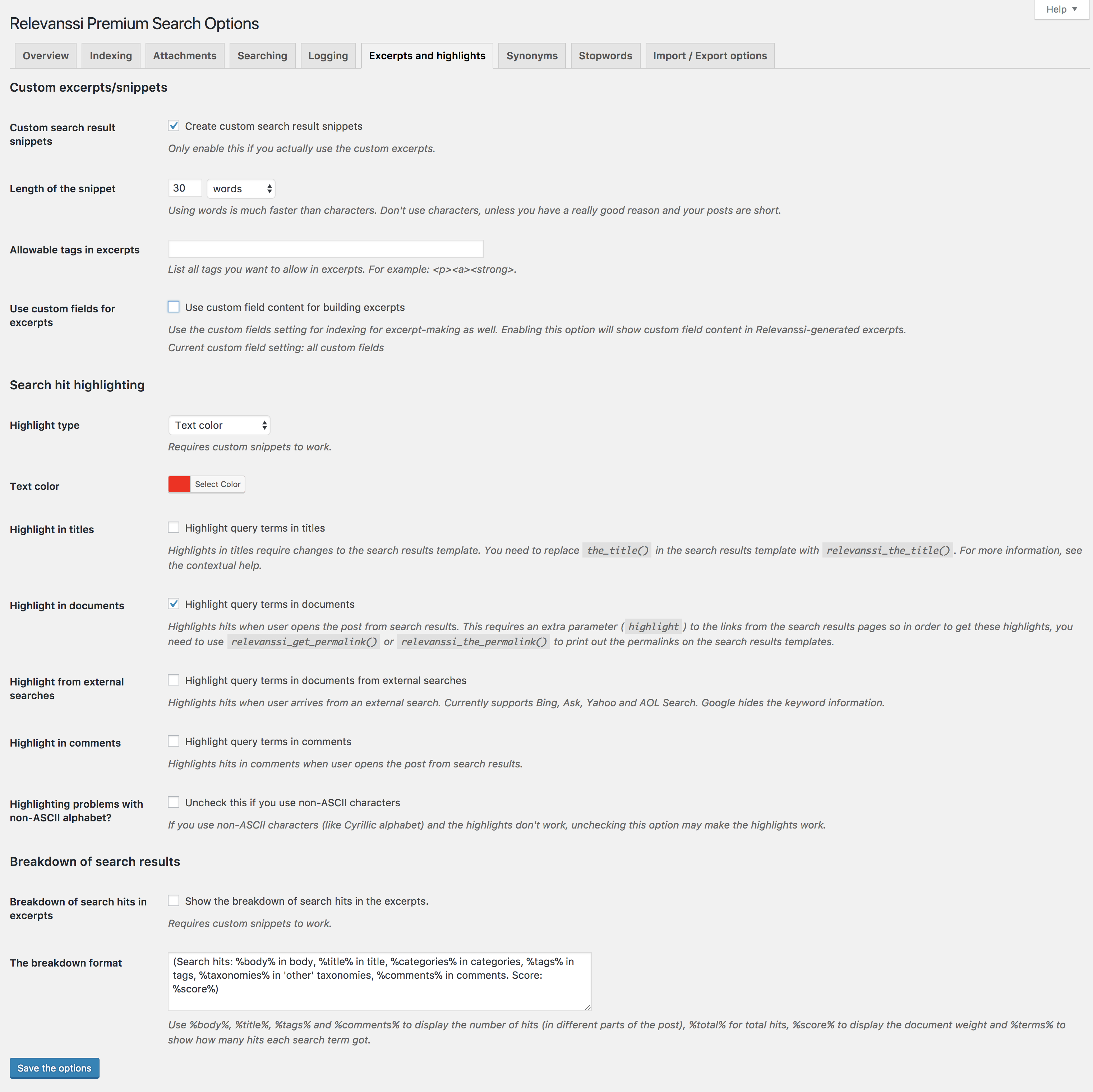
Excerpts & Highlights tab
Custom search result snippets
Relevanssi can dynamically generate excerpts that highlight the user’s search query. It temporarily overwrites the standard excerpt during the search loop. Your search template must use the_excerpt() to see this in action.
Length of the snippet
Set the length in words or characters. Using words is significantly faster.
Allowable tags in excerpts
List HTML tags allowed to pass through the excerpt without being stripped (e.g., <p><a><strong>).
Highlight type
Choose the HTML tag or CSS class used to highlight the search term. Using a CSS class (e.g., <span class="relevanssi-highlight">) is recommended so you can style it cleanly in your theme’s stylesheet.
Highlight in titles & documents
To highlight terms in titles, replace the_title() with relevanssi_the_title() in your template. To highlight terms when the user clicks through to the actual post, you must use relevanssi_get_permalink() so the query string is passed to the destination page.
Breakdown of search hits in excerpts
Appends analytical data to the end of the excerpt. You can use format variables like %body%, %title%, %score%, and %terms%.
Synonyms
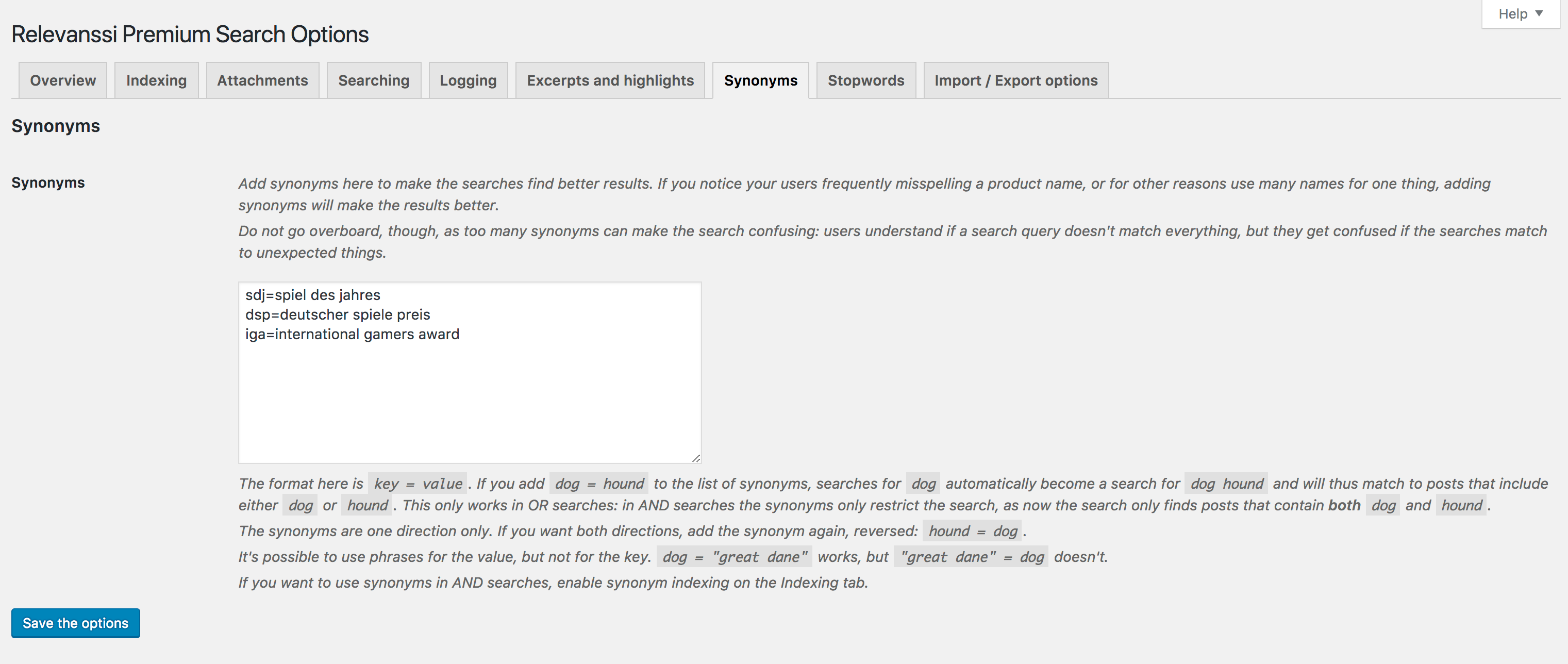
Synonyms tab
Synonyms allow you to link acronyms and variations (e.g., sdj=spiel des jahres). These are one-way pairs; searching the left side expands the search to include the right side. To make it bidirectional, add two separate entries.
Synonyms naturally work best with OR searches because they expand the query pool. To use them effectively in AND searches, ensure you have enabled the “Index synonyms” option on the Indexing tab.
Stopwords

Stopwords tab
Stopwords are meaningless, highly common words (like “and”, “the”, “in”) that are excluded from the index to save space and speed up queries. Relevanssi automatically loads stopword files based on your WordPress language setting.
Clicking a word removes it from the stoplist. Adding a word automatically strips it from the existing index immediately.
Content Stopwords
Content stopwords function exactly the same, but are only applied to the body content. This allows you to exclude a word from the body index while still allowing users to search for it if it appears in a post title.
Import / Export Options (Premium only)

Import / export tab
This field contains all your Relevanssi settings in serialized text format. Simply copy the block of text and paste it into another Relevanssi installation to instantly clone your configuration. Ensure both sites are running the same version of Relevanssi before importing.
159 Comments. Leave new
Hi, how can I change the placeholder text in Relevanssi? Thank you very much!
There’s no placeholder text in Relevanssi. The search form HTML comes from your theme, or WordPress core.
Hi, Mikko! I installed Relevanssi free version and do testing for fuzzy search – i typed Zirconia and get results, but when typed Zirconya, i do not get results(I have posts with post_title contains Zirconia). My question is – what i did wrong, why fuzzy serach do not work?
Alex, Relevanssi does not have a fuzzy search like that. The partial matching means that you can search for “zirconi” and find “zirconia”. If you need a search that fixes misspellings, you need Relevanssi Premium.
Sorry if this has been asked before… If I have multiple matches of my search terms in a post, is there any way I can have multiple snippets of the matches in my returned excerpt? (the_excerpt or relevanssi_the_excerpt). I seem to only get the first one…
Marco, the free version of Relevanssi gives you just one snippet (not the first one, but the best one); Relevanssi Premium can generate multiple snippets.
Hi Mikko,
First of thanks for the awesome plugin and respect for the great job!
I have 2 questions and I hope you can help 🙂
I’m running a Woocommerce store. There are products available in different colors. The thing is, the search query I’d like to show results for, is included only in the image title of the product variation. For example “green chair” is included in the title of the image of a variation of a product with the title “A dining chair with wooden legs”.
When the plugin is set to index “variations” it doesn’t return a result for that product at all because the title of the product doesn’t contain the query. When I include indexing of “attachments”, then results are returned, but if I have numerous product images in the main product gallery that include the search query in their names, the results include all of them which is user unfriendly.
Is there a way I can set the search to return results only of images that are manually set for the product variations, but not all images in the product gallery that contain the search query? That would be the most clean and relevant result. Of course I don’t wish to exclude from results main product pages that contain the query in their titles.
And one more question – I have thousands of attachments that are of assembly schemes that I don’t need to show in search results, but they include in their names different user queries and are shown on the results page. Is there a way to exclude such files? For example all those files include the word “scheme”. Can I exclude from results all files with “scheme” present in the title?
Thanks!
Dave, the image shown on the search results page has nothing to do with Relevanssi; it’s up to the search results template in your theme. You can modify the template to control which images are shown. It’s somewhat tricky to make the search show the image of the matching variation; I don’t have a ready solution for that.
Yes, you can exclude posts based on the title. See relevanssi_indexing_restriction for the best method.
Is there a way to exclude Private pages from showing in the Search Results in the free version?
Yes. You can use the relevanssi_valid_status filter hook to control which post statuses are included in the results. Note that Relevanssi should never show private posts in the results to users who can’t access them; if someone is seeing private posts they can’t access, something’s wrong.
Hi,
I am trying to get Relevanssi to work with the divi theme on wordpress. I use the divi search module.
This does not work. I added this code in my function.php of the child theme but the search results are only on the posts.
add_action( ‘pre_get_posts’, function() {
unset( $_GET[‘et_pb_searchform_submit’] );
}, 1 );
It’s very frustrating especially since I’ve just spent the day setting up the module and reading the docs.
What am I doing wrong?
Is there a special configuration? Can you please help me?
Thanks
Can Woocommerce products appear in order based on the individual item’s weight value which can be set manually?
Possibly a custom field’s value that overrides everything else?
thanks
Marwan, yes, you can do that. See orderby parameters in WP_Query. You can set
orderbytometa_value_numto sort the results by a custom field value.I’ve just installed relevanssi on https://csi.5in.in/ and basic search seems to work fine, the relevancy sort is great.
However I can’t seem to get synonyms to work. I’m trying to get searches for personla to show results including personal so entered:
personla =personal
knowlege=knowledge
but searching for personla still returns no results. Searching for personal returns results.
Any ideas?
And is there any general library of US/UK spelling synonyms available?
thanks,
Prachi
Looks like it’s working now, “personla” and “personal” return the same results. Were you perhaps using the AND search before? Synonyms require using the OR search.
I don’t know of general US/UK spelling synonym libraries, but I don’t know if it’s that useful anyway. You know the key vocabulary used on your site, stick to those words. Random unrelated words aren’t that important. If you enable search logging, you can see the most common unsuccessful searches, which will give you a solid clue of what kind of words you need to focus on.
How can I add the Relevanssi search engine to one of my pages?
The easiest way is using the search form shortcode, but you can use any standard search widget, too.
I made a mistake when I upgraded from free to premium on my test site—I deleted free Relevanssi, then installed Premium. Lesson learned.
But just to be clear, once I have installed Premium, *then* it’s okay to delete the free plugin, correct?
Nick, correct: the uninstall method in the free version is clever enough that it will check if Premium exists before deleting everything.
Is there a way to add a search bar somewhere in the WP admin area, so I can search all posts/pages at one time?
Mark, there’s Relevanssi search at Dashboard > Admin search.
Hi! I am using the Astra theme and Elementor Pro, which I created a Search Page template in. I clicked everything on the Index and built it, it says I have :
41 documents in the index.
3474 terms in the index.
84 is the lowest post ID indexed.
My site utilizes WordPress and WooCommerce. However, upon testing, the only search result I get back is the introductory post I’ve written, which was the issue before I uploaded Relevanssi as well. Furthermore, if I type in a random search term, it still pulls that same blog post, same as before, even though I know there is nothing about duck-billed platypuses on my site.
Thanks for your help!
Emily, the key here is the Search Page template: the Elementor Search Page templates are not compatible with Relevanssi. In order to be able to use Relevanssi, you need to use the plain WP search results template.
If possible, please contact Elementor and let them know that you’d like to be able to use Relevanssi with the Elementor Search Page templates. That won’t be possible until the Elementor people figure out that’s what their users want and add support for Relevanssi.
Did just that. After deactivating Relavanssi temporarily, I have the same issue. Something is up with Elementor, but it should definitely be compatible anyway! Thank you for your quick response. Stay healthy.
Hi there,
Does this plugin auto suggest words? For example, if I type in “Fo” could it show results for “Ford”?
Bobby, Relevanssi doesn’t have auto suggest feature, but it has partial word matching. If you search for “For”, it will match posts that have the word “Ford”.
I want to No Index my website Terms of Use page for the search engines but Index it in Relevanssi. When I add the No Index flag to the web page, it also becomes No Index for Relevanssi.
Is there a way to force indexing in Relevanssi even though the search engine No Index flag is set for a page or post? Thanks.
Jerry, if you’re using Yoast SEO, see these instructions. If you’re not using Yoast SEO, please let me know what you are using.
Yes, I am using Yoast SEO.
Thank you for the quick reply and the link to the code change needed to disregard the Yoast SEO “noindex” setting.
Best regards.
Hi, The highlighting is not working. I want it highlight the keywords found in search.
The options guide as this:
Highlights in titles require changes to the search results template. You need to replace the_title() in the search results template with relevanssi_the_title().
But I am not able to find the “the_title()”
I have searched whole wordpress files but I can’t find that tag,
Can you help me where I can change so it will work.
Thanks
Habib, which theme are you using?
I have the same issue and I’m using the Beaver Builder theme. Can’t find the_title() anywhere.
Denise, unfortunately I can’t help with Beaver.
Hi, we have a retail site and use WooCommerce. The products sku and full product code are different – because there are often variations within each product. If you search the sku (also the same as the quickcode in most products), it shows search results. If you try and search the full product code (layout 123.456.789.123) nothing comes up, saying no product found to match.
I’ve been through everything I can think of but still haven’t managed to make it search full product codes. At the minute the punctuation is set to remove.
Can you help? Is this a limitation or am I just missing something obvious?
Where is the full product code stored? If it’s in a custom field, is Relevanssi set to index that custom field?
Hi, I’m looking for a possibility to exclude text written in the header (logo claim) from search without including the search terms to stopp-words. Is there a way to exclude all content from the search that is not directly part of a page or post content?
Annika, the best solution depends on the case. Why is the content you want to exclude included in the post content in the first place? Is this some kind of page builder? Please post to the support forums with more details.
Just tracked down a (em) issue and wanted to report it. We have a few post titles that have (em) tags. When I searched for the exact title with quotation marks I was not getting any search results. When I searched for the exact title without quotation marks I did find it.
Did a little digging and figured out that the (em) tag had to be added to the title in the search box when I was using quotation marks.
For example:
Does not work: “Preparing for inquiries generated by Instant Family”
Works: “Preparing for inquiries generated by (em) Instant Family (em)”
None of our users would know to do this (not sure how many even search with quotation marks) but this bug was reported to me so I had to track it down. Can this be fixed in a future release? Thanks!
Tracy, it’s not really a bug, just a limitation in the search. When you do a phrase search with quotes, Relevanssi compares the search query against your database literally. If there’s a HTML tag in the text, it needs to be in the search query, otherwise there isn’t a match, because the search query doesn’t match the database literally.
There are two solutions for this, but unfortunately neither of them is feasible. One would be to strip the HTML tags on the go, but that takes way too much time and slows down the search to a crawl. The other would be to save a copy of the post content without the HTML tags somewhere, but that requires too much space in the database.
btw: could you allow or provide em and other highlighting code with a class? So I could use it elsewhere without further css hacks?
Please elaborate, I don’t understand the question.
I have a submenu in a template row/column that appears on every page. If someone searches for a word that happens to appear in the submenu too, every page is listed in the search results. Is there anyway to ensure Relevanssi doesn’t list irrelevant pages by letting me force it to ignore certain div blocks on the page?
For example, in the submenu, we have the word ‘Skincare’. If a user searches the word ‘Skincare’, even if a page has nothing to do with skincare (such as Digestive Health), it becomes listed.
I hope my question makes sense.
Best regards
Joe
Joe, it’s possible; the menu is probably added as a shortcode to the page, and if you block that shortcode from Relevanssi indexing, it won’t be indexed. If you can tell me how the submenu is added to the page (ie. which shortcode is used), I can help to remove it.
Hi Mikko,
Thank you for your last response , was very helpful. Just another quick couple questions, apologies if the answers are a bit obvious.
Is there any documentation I could read through that might help me learn how to limit a search to a specific part in our site (Q&A section)?
If we were then built the index, would it only index the terms in that specific part of the site (Q&A section)?
Thank you for all your help.
(I have attached a link to the section of the website incase that was useful)
Chris
It all depends on how the Q&A section is defined. It looks like it’s a page, so are we talking about indexing a page and all it’s children pages? Just “Q&A Section” doesn’t mean anything, the only thing that matters is how it is implemented in WordPress terms.
If you’re looking for indexing a page and its children, then you need to set up Relevanssi so that it only indexes pages. Then you need a filter on the
relevanssi_do_not_indexfilter hook that will see if the page being indexed is a child of the Q&A page or not. Something like this:add_filter( 'relevanssi_do_not_index', 'rlv_only_qa_children', 10, 2 ); function rlv_only_qa_children( $block, $post_id ) { $block = true; $parent = wp_get_post_parent_id( $post_id ); if ( 123 === $parent || 123 === $post_id ) { $block = false; } return $block; }Just replace “123” with the post ID of the Q&A page, and this will only allow Relevanssi to index that page and its children.
Hi, was looking to purchase Relevanssi but need to check:
1. Can the plugin only search a very specific part of our site (Q&A section). From what I have seen it looks like you can only specify whether pages or posts are searched, but not specific pages or posts or a specific section like our Q+A.
2. Can we define our own keywords (tags), without Relevanssi generating any automatically? This is because we want to have a single tag word for each topic, which users might search for with acronyms or synonyms. E.g. the tag “Mayer-Rokitansky-Küster-Hauser syndrome (MRKH)” can be found with full term, or acronym – or plural or any other possible synonyms – and can we define these synonyms in connection with keywords? In this e.g.,”Uterine Agenesis” has the same meaning but may not be named as such.
3. Can Relevanssi find search results for the keywords using our articles’ WordPress tags? I.e. an article we have tagged within WordPress as “Mayer-Rokitansky-Küster-Hauser syndrome (MRKH)” even if they don’t contain these terms.
Any help or additional information would be much appreciated! Plugin looks really great!
Chris
Chris, yes to all three! 1. is either very easy or slightly more complicated, depending on how the sections are set up. Limiting a search to a post type, category or certain page hierarchy is easy, for example.
2. Relevanssi doesn’t generate any keywords or tags. By default Relevanssi indexes post titles and post content, and you can enable other stuff, but you can also disable content and title searching if you only want to search tags. You can add synonyms.
3. Yes, Relevanssi can find posts by their tags, and can also find the tags themselves if you want to.
Hello! I was wondering with stopwords, if there’s a way to customize the message displayed so that it doesn’t show “no results.” – Or can I at least do that within my search.php results page?
Megan, that’s really up to your theme. Relevanssi has no control over the message, it comes from your theme.
Hi Mikko
First of all I would like to thank you for your plugin. It’s really helpful.
I just have a concern regarding the searching logic, I see that the logic considers the weight based on the tf value calculated which reflects the number of times the word is mentioned in a post. This approach could cause some confusion when a sentence containing a keyword present in most of the articles as the weight will give priority to the posts containing this specific keyword more than other posts containing the whole sentence but the keywords are not repeated. For my case, I preferred to adjust the weight through the words mentioned rarely by dividing the weight by the $matches->count and the tf value to focus on the posts containing more words of the searched sentence.
I did workaround on that through this function:
function adjust_match_weights($match, $idf, $term ) {
global $wpdb;
$term_count = $wpdb->get_var(“SELECT COUNT(term) from wp_ecrs_relevanssi WHERE term = ‘$term'”);
$match->weight = $match->weight / ($term_count * $match->tf);
return $match;
}
add_filter(‘relevanssi_match’,’adjust_match_weights’, 10, 3);
It’s working fine. However I needed to add a separate query for each term through the loop to get the $matches->count value as the hook relevanssi_match doesn’t included. I don’t think this is the best practice due to increasing the database queries when $matches->count was already accessed before. It can even be used if I updated the core but not through accessing the relevanssi_match filter. Could the $matches object be included in the apply_filters function in a next update?
Also regarding the synonyms, I noticed that if I added a synonym key and value it’s stored in the options table. However, if I came afterwards and wrote another synonym key and value it will overwrite the previous value in the database. I think that a simple concatenation function can solve this issue in the interface.php file.
Is there a concern changing this line:
$value = str_replace( $linefeeds, ‘;’, $_REQUEST[‘relevanssi_synonyms’] );
To be that way?
$value = get_options(‘relevanssi_synonyms’). “;”. str_replace( $linefeeds, ‘;’, $_REQUEST[‘relevanssi_synonyms’] );
I tried it and it worked, however there are no filters here which means that I need to update it in the core. If I did so, I will need to change it every time I update the plugin. Couldn’t this be incorporated in a next update?
Thanks
Mohamed, I’m not really catching the reasoning behind your weighting suggestion. The TF × IDF weighting has been an industry standard for 60 years and for a good reason; it generally works really well. If you want to make a post with a smaller weight for a particular keyword rank higher for that keyword, the easiest solution would be just to pin it using the pinning feature in Relevanssi Premium: that will guarantee first ranking in the search, without any additional code.
Your filter function is indeed not good for the performance: running all those extra queries will hurt the performance a lot. Why not use IDF instead? It’s already passed as the parameter to the filter, and while it’s not exactly the same as the term count you’re calculating, I think it’s generally the more useful number. Looking at the IDF is more helpful than the raw TF across the whole database, because the raw TF has no upper bound, while IDF has (the number of documents).
Passing the $matches array as a parameter to the filter doesn’t help, because there’s no $matches->count value in it – Relevanssi doesn’t calculate the raw TF.
Your suggested fix for the synonym interface would break it badly. Your change would make it impossible to ever remove synonyms, and the same synonyms would be duplicated many times every time the synonyms are saved. There’s no need to fetch the option value, because
$_REQUEST['relevanssi_synonyms']already includes all the synonyms, both old and new. If it doesn’t on your site, then there’s something wrong with the way your site works. It’s working as it is.If stopwords do not work because people are not looking for it – like the word Downloads (as we want to lead capture to those pages), but you have that keyword in a page title, can you exclude the page ID from search results somewhere?
With Relevanssi Premium, you could just check the “Exclude this post” box on the post edit page. With the free version, list the page ID in the “Post exclusion” setting on the searching page.
Is it possible to have more than one search on the same site using Relevanssi? We would like to have a site wide search and then on a calendar page have a search that would only return calendar items
Yes, you can have as many different search forms as you want. On the Relevanssi settings page, click the “Help” button on the top right corner and see “Helpful shortcodes” there for a method of creating extra search forms that only target specific posts.
Has Punctuation control been moved? I can’t seem to find it.
Ciaran, no, it’s still under “Advanced indexing settings” on the “Indexing” tab of Relevanssi settings.
Hi, Mikko
I was just wondering if it’s possible to make Relevanssi show results only when the beginning of the word matches the search term?
Algirdas, yes:
add_filter( 'relevanssi_fuzzy_query', 'rlv_only_beginning' );
function rlv_only_beginning( $query ) {
    return "(relevanssi.term LIKE '#term#%')";
}
Add this to your theme functions.php.
I was searching for its widget, when I guessed it could work with the existing search widget.
Indeed, there’s no Relevanssi search widget, because the default search widget is just fine.
Hello, Relevanssi was working fine, but after WPENGINE CDN, stopped working. Is it due to CDN and cache, right now the intended search page doesn’t show when clicked on search
Omer, CDN should have no effect on this; caching may, I suppose. No idea how that would actually have an effect.
Hi Mikko, thanks for a great plugin! I have a site running on WPEngine and Relevanssi worked fine there since installing it in May. After updating the plugin to the latest version I get 502 bad gateway errors from every search. After disabling Relevanssi the search feature works as expected (but obviously search results are not as good as with Relevanssi enabled). Have you heard others on WPEngine reporting this? Would love to help fix this problem!
Ville, no, this is the first complaint I’ve heard. What kind of settings you have, and how big is your database? 502 usually means the search is too heavy for the server.
Found a possible issue after some debugging.
The plugin seemed to crash in the Polylang compatibility filters (even though I don’t have Polylang installed). The real issue might still be related to WPEngine but after installing Polylang the search works again!
I’m happy debug a bit more in order to find out the real issue but at least I can enable the plugin again.
Polylang compatibility filters shouldn’t even load unless Polylang is installed. Does your site return true for
function_exists('pll_get_post')when Polylang is not installed? If Polylang compatibility runs when Polylang is not installed, I’m not surprised there’s a crash.Found the real issue after more digging.
The site used a theme that had some “helpful” Polylang fallbacks, just in case Polylang *isn’t* installed. Indeed the theme declares pll_get_post and some other Polylang functions if they don’t exist.
Happy to say that Relevanssi has nothing to do with this, this was a problem with the theme.
Hi,
I’ve added Relevanssi to our e-com site, yet I do not see any products when searched (with exact product tags). The search only shows blog post results. What am I missing? Thanks.
Raina, your theme is restricting the search results to posts. See “Search for other post types” on this manual page.
Hi there , I am using Relevanssi on my woocommerce website, I have enabled indexing product tags which it is doing fine the problem is it is reading space as a character like it gives 0 result for handmade but gives result for hand made which is a tag.
Kindly reply if its a bug or am I missing some thing..
Kind Regards
Sana, “handmade” and “hand made” are two different things, and Relevanssi can’t tell they’re the same thing. Relevanssi doesn’t understand language. Add a synonym “handmade=hand made” in the Synonym tab.
Thank you for the fast reply. I am using the download attachments plugin and for some reason that shortcode is not being ignored. The download attachments plugin has an issue with PHP 7.1+, but I am assuming that should not have an impact on indexing since it should not be rendering it at all. I setup a test site at http://avada.cfuser.com to troubleshoot the issue if you want to see it.
Stephen, since you’re a Premium customer, go to the support page and send me a support request there, with more details of the problem. What exactly is the problem with the shortcode?
Two questions.
1. What is the latest version of PHP you are supporting?
2. What is the correct format for ignoring shortcodes : basic or with all attributes e.g. [formidable] or [formidable id=”1″]?
Stephen, any PHP 7 versions should be fine. Oldest we support is 5.6.
Disable shortcodes using just the name of the shortcode, no attributes are necessary. It will disable all occasions, no matter the attributes.
Dear Relevannsi Team,
I am using your plugin and am happy so far. One question that came up is when looking at the search results page. That little “document” icon on the right of the search result, can this be deactivated. The user would arrive at the content page containing the seach term, clicking at the title of the page it was found on in the search results and via clicking this little icon. This are two links to the same and therefore might be a bit misleading. Can I deactivate that icon?
Thank you for your excellent work and plugin.
Best regards,
Max
Max, that is not a Relevanssi feature. It’s coming from your theme. You need to edit your theme search results template to fix the issue.
Not able to search the Chinese text..
Relevanssi is not indexing the Chinese posts..
Any luck..
If the Chinese text is in UTF-8, Relevanssi can read it and index it. However, Relevanssi simply does not work with Chinese or Japanese: these languages do not separate words in a way Relevanssi understands. Thus, even if you could index the contents, they wouldn’t make any sense. So unfortunately you have to forget about using Relevanssi with Chinese or Japanese.
Is there a way to prioritize pages over blog posts with the premium account?
Yes, Premium has post type weights you can use to make pages come on top. With both versions you can write code to sort results by post type: https://projekt77.ccsolution.at/knowledge-base/separating-posts-by-post-type/
With relevanssi enabled for admin search, I get no results, when I search my menu to find posts or pages. I need the admin search because I have 10,000 posts and relevanssi helps me get more accurate search results when looking for post name, so it is working great when just looking for posts in the general post section admin search, but when I want to find a post to add to my main menu (under appearance), the search brings back 0 results. Any ideas how to fix this?
Looks like this is some bug in Relevanssi. I’ll have to investigate. I’ll try to fix this for the next version of Relevanssi.
Hey! I’m not sure if you fixed this yet. I have the same problem when searching for pages in the actual pages section. Relevanssi turned on for admin simply returns 0 results.
Yes, this was fixed. Are you using the latest version of Relevanssi?
Could the problem be that the search functionality is going against form entries rather than a page with text?
Are those form entries posts in the WP database? If not, the answer is no.
No they aren’t posts – I’m new to this – so should I put the spreadsheet in a post somehow and just not show that post?
Please post your problem on Relevanssi support forums: https://wordpress.org/support/plugin/relevanssi
Explain what you’re trying to do, what should be found in searches and what not, and what is the exact nature of your problem. I don’t quite understand what is your problem now.
Installed relevanssi and can’t get the synonyms to work either. I have the default operator on “OR” so I can’t figure out what I’m doing wrong.
Is the search powered by Relevanssi in the first place? Does adjusting Relevanssi settings or disabling Relevanssi affect the results at all?
I thought installation and activation meant that Relevanssi would then enhance the existing search capability in WP. Is there something else I need to do to invoke Relevanssi searching?
Generally no, but some themes block Relevanssi from working and need extra work. Checking whether Relevanssi is actually powering the search is one of the basic debugging steps if you have problems with Relevanssi.
What are the extra steps? I’m using Forever Wood – is that a problem?
That’s the first I ever hear of that theme, so no idea. Try switching to one of the default themes – does the search work then? If it does, then the problem is likely your theme. If it doesn’t, then it’s something else.
But the easiest thing is to just disable Relevanssi and see if the results change. Do that first.
I am having trouble entering stopwords containing apostrophes. When I add “aren’t”, it displays as “aaren\\\’t”. Furthermore, if I click on it to remove, it won’t let me. Showing error msg: “Couldn’t remove term ‘aaren\\\\\\’t’ from stopwords!”
Thanks, will fix this in the next version.
Thanks for the update, Mikko. I am now able to add stopwords like “aren’t” but still can’t remove the old ones, same error. Any suggestions? Perhaps manually remove them from the DB?
Yeah, manual is probably the best.
I’m newbie with installing wordpress script. Is this a way that I can add this pluggin into my menu nav?
Thanks!
Here’s how you can add a search box to a WP nav menu: https://wordpress.org/support/topic/add-search-box-to-nav-menu
Hi,
i would like to disable indexing of post excerpts. Is it possible?
It’s an option you need to enable in Relevanssi settings in the first place.
I did, but post excerpts are still indexed and this is a problem for me. Can you think of anything that went wrong?
Thank you
Have you rebuilt the index after adjusting the setting?
Can I create multiple search boxes with different setting? So on certain pages I want the search bar to be restricted to a set of categories, but for the search bar everywhere else I want it to search site-wide?
Yes, you can.
Hi! Is there any documentation on how to do this?
No, not in particular, but there’s not much need, either. Just create a search form that has a category parameter (hidden input field named “cat”; for exact parameters see WP_Query documentation in WP Codex), then create another search form with different parameters, and place those as you see fit.
That helps! Thank you.
Hi Mikko,
Thank you for creating this great plugin! Your work is benefiting a lot of WordPress users.
Just a small question…
I checked the box for highlighting query results in titles, but somehow no difference is shown. My site runs on the Genesis framework with a StudioPress child theme. The URL for you to test is:
http://hashimnaushahi.com
I haven’t got any posts of myself on it yet, just some demo posts. So you can try searching for ’email’ or ‘mobile’ to see how the results look like.
Could you help me out with this?
Thank you in advance!
Sincerely,
Hashim
Hi, highlighting in titles requires changes in templates. Unfortunately, since you use Genesis, you’re pretty much out of luck, unless you’re skilled in Genesis template editing – it’s not an easy thing to do. You’d have to change the_title() functions in the template to relevanssi_the_title() – a very simple thing, but rather complicated with Genesis.
I am trying to exclude some pages with “Exclude these posts/pages from search:”. But it doesn’t work. Pages continue appearing on searches. These pages would be “635, 298, 639, 379, 294, 668, 1782, 147, 2920, 2874”. Some solution?
Are you running the latest version of Relevanssi? Are you sure that your search results are coming from Relevanssi?
Versión 3.3.5. I am not sure at all, but I think It’s running via Relevanssi. Our web is tavad.com. Can u check?
I can’t even get to a search results page from the search.
And how can I be sure the website is using relevanssi? I have added the code in functions.php and after that, shown results have been different to WP results
What code did you add? Relevanssi shouldn’t require you to add any code, anywhere. Also, do you have working search on your site somewhere? When I try to use the search on your home page, I don’t get any results page at all, I just get the home page.
I have added http://abcnews.go.com/US/millionaire-hiding-envelopes-cash-san-francisco/story?id=23871103 due to I am using an Enfold Theme. It’s on Top-Right. You can try to search “tratamiento cocaina”.
Ok, now I’m seeing a search results page. Looks like Relevanssi, yes. As for the exclusion not working – I’m not sure. There shouldn’t be any reason for it not to work; I just tested it on my test blog, and the feature works just fine.
Ok. Could it be due to Enfold theme?
[…] to get a really detailed overview of how the plugin works and in which ways it can be customised, the documentation from the developer comes highly […]
I’m not certain if this is something I could use the synonyms feature for but when I search the word S&P I only get searches for the letter S and the letter P. Is there a way to treat the ampersand as part of the word? There are hundreds of posts with the word S&P in them.
Bad_Self, read this post: http://www.relevanssi.com/knowledge-base/words-ampersands-cant-found/
Hi Mikko. My client would like the search results to show the relevancy score,YET have the results displayed by DATE. I have selected this option in the settings: Default order for results: POST DATE. But it is still displaying by RELEVANCE. Any thoughts? can you help?
No idea, changing the setting should change the order immediately. Displaying the relevancy score should have nothing to do with that.
I can’t seem to get synonyms to work either. I’ve entered
obits=obituaries
But I still get 0 results if I search on “obits,” even though “obituaries” gets pages and pages of results.
Any thoughts? Am I entering it in the box wrong — do I need quotes or anything? The method I’ve been trying is word pairs, 1 to a line. Should I comma delineate?
Thanks so much.
Are you using OR search? Synonyms don’t work in AND search. The format is correct.
OH I get it now. Yes, I was using AND search. In your previous answers I wasn’t realizing you meant as a total setting, not an individual query. Sorry about that! And thanks.
For me do not work. I using WordPress 3.5.2. Nothing happend when i type something. What can i do?
What do you mean “nothing happened”? Does your blog load the search page at all?
Type here http://truliluli.ro/ if the plugin work please.
Looks like the search works on that site.
Where did you check that?
Did you use the search box in the header and it works?
Yeah, the search box worked just as expected, and the results seemed sensible: http://truliluli.ro/?s=sherlock
Hmmm, but do not work like here http://www.mindtheproduct.com or here http://www.filmsforaction.org/ for example … And i dont understand why
Should not work the same?
No, that’s not Relevanssi. Relevanssi doesn’t have an AJAX dropdown search.
Oh … ok thats the problem :0 thank you mister.
I’ve just installed relevanssi on http://www.mindtheproduct.com and basic search seems to work fine, the relevancy sort is great.
However I can’t seem to get synonyms to work. I’m trying to get searches for prioritization to show results including prioritisation so entered:
prioritization=prioritisation
prioritisation=prioritization
but searching for prioritization still returns no results. Searching for prioritisation returns about 10 results.
Any ideas?
And is there any general library of US/UK spelling synonyms available?
thanks,
Martin
Can you say me what AJAX dropdown search plugin use http://www.mindtheproduct.com?
Thank you.
Dave’s WordPress Live Search, which as far as I can tell is not compatible with Relevanssi.
Thank you Mikko, but thats not good if the plugin is not compatible with relevanssi
Are you using OR search? Synonyms don’t work in AND search.
I don’t know of such synonym library.
Hi Mikko, is it possible to add more than 1 synonym to 1 word for example “red=rouge,rot,rod “?
Thanks,
Alex
Yes, but this way:
red=rouge
red=rot
red=rod
I am sorry to use your time, I have not have any issues but, is there a way to customize or personalize the output? I have created a Search page in WP but that does not affect the search page produced by the widget, I do not see any tab or way to access this and modify it in Elementor
Jose, can’t really help with Elementor, I don’t know much about that. Outside Elementor, the way to modify the search results output is to modify the search results template, and you can do pretty much anything you want with that.
Hi Mikko, I just tried to install the free version but am not seeing any changes in the search widget. I have a premium theme from Solostream (Wp-Mysterious) and also I have checked the “Use Search for Admin” box. What do I need to do to get this to work?
It may be your theme is incompatible with Relevanssi. The search widget shouldn’t change, but after installing Relevanssi and building the index, you should see different search results. Read this: https://projekt77.ccsolution.at/knowledge-base/query_posts/
Nope, there is no “query_posts()” in the “search.php” file for the Wp-Mysterious theme. Can you recommend another advanced search plugin that might work? Specifically one that allows users to search within certain categories or for posts that carry certain tags. Or might you be able to tell me what search plugin the website http://www.filmsforaction.org is using? That would be ideal. Thanks!
I have the same with another theme from Solostream.
The search result page stays the same.
The suspicious code into search.php is reported below:
====
===
Hi, What can I do if my theme has no search functionality? http://themeforest.net/item/heal-responsive-medical-wordpress-theme/3127829?sso?WT.ac=search_item&WT.seg_1=search_item&WT.z_author=raybreaker
Just add it. WP under the theme has search functionality, theme can’t overrule it. Just copy the search form from any WP site – it’s a GET form that has the search terms in an input field ‘s’. Then it’s just a question of setting up a search results template, if the default doesn’t work.
So, with your theme, we just use the default search widget? Or…do we add it somewhere? This could be made more clear in the documentation for us n00b users. You went in depth on everything else – but this.
Yes, just use the default search widget. It is not mentioned, because in most cases, you really have to do nothing – just use the search widget your theme already has, and most themes do have one.
It’s still incredibly confusing. Most plugins come with their own widget, so not mentioning it at all, anywhere, is not really helping 🙂
[…] As per all plugins, settings depend on the individual website. The default settings on Relevanssi are more than adequate for most sites. Read through the settings page as its very well explained. Here is a link to the Relevanss website which explains all the settings. Relevanss Site. […]